Alarm Translators
An alarm translator watches a field that has already been decoded from a device and raises a true/false alarm when the value crosses a threshold you set. Yggio ships a set of ready-made ones covering common quantities, plus a generic one that works on any numeric field.
Alarm translators are chained translators: they run on top of the device's hardware translator and read fields it has already produced, not raw payloads. Add one to a device and the alarm fields appear alongside the device's normal data, where views, dashboards and the Rule Engine can use them.
This is also how anomaly monitoring is normally done in Yggio. An alarm translator catches the unusual behaviour that can be described as a threshold, a band, a rate of change or a time window, which covers most cases and needs no training period.
Why use an alarm translator
A threshold could be written straight into a rule. Putting it in a translator instead is what keeps the rules simple.
The translator does the detecting, and it can be tailored to the exact behaviour of the scenario being monitored: a plain limit, a warning band and a critical band, a rate of change, a condition that has to hold for several reports in a row, or an algorithm such as mould risk. However advanced that logic is, the result is always the same shape, a boolean. The rule is then only ever detect, then act: the alarm field turns true, so send an email or an SMS, or set an actuator. One simple rule serves a whole estate, whatever each device is actually watching for.
Time is part of that. A translator can filter on time of day, so an alarm is only raised when it actually matters: a classroom worth ventilating during school hours, quiet hours enforced between 22:00 and 06:00, an empty building overnight left alone. The translator raises a separate in-window alarm that clears itself when the window closes, so one rule can notify the day shift and another the night shift, and neither rule has to know anything about the clock.
How thresholds are set
Thresholds are translator parameters, set on the translator when you add or edit it on the device. Most parameters are optional and carry a sensible default, so a translator usually works the moment it is added and can be tuned afterwards. Some are required: leave one of those blank and the translation fails at runtime rather than falling back. The translator's own description in the UI lists each parameter and its default, where it has one.
Most alarm translators also still accept the value from a contextMap entry of the same name, so older setups keep working. Migrating them to translator parameters is recommended: the parameter list states what each value is for and what its default is, which the context map does not.
Two behaviours apply across the whole family:
- Hysteresis. Each threshold has a hysteresis band, so a value sitting right on a limit does not toggle the alarm on every report. The alarm trips at the threshold and only clears once the value has moved back past it by the hysteresis amount.
- Log entries. Most alarm translators emit a ready-made
logentry when an alarm first trips, and a cleared entry when it recovers, so nothing lingers in an alarm view. The message includes the triggering value. A rule can pick it up to send an email or write to the account log.
If the input field is missing or the thresholds are inconsistent, the translator writes an errorMessage instead of an alarm. It is shown in the device's Data section under the All filter.
Available alarm translators
Temperature and humidity
| Translator | Alarms on | Alarm fields |
|---|---|---|
set-alarm-temperature | Air temperature above a high limit or below a low limit | temperatureHighAlarm, temperatureLowAlarm |
set-alarm-temperature-dual-high-low | Temperature, with two bands: a broad warning band and a tighter critical band | temperatureHighAlarm, temperatureLowAlarm, temperature2HighAlarm, temperature2LowAlarm |
set-alarm-temperature-from-average-temperature | The same as set-alarm-temperature, but reading averageTemperature | averageTemperatureHighAlarm, averageTemperatureLowAlarm |
set-alarm-temperature-f-dual-high-low | Two-band temperature for sites that report in Fahrenheit, so thresholds are set in °F | temperatureFHighAlarm, temperatureFLowAlarm, temperatureF2HighAlarm, temperatureF2LowAlarm |
set-alarm-external-temperature-dual-high-low | Two-band monitoring of an external probe, such as a fridge, freezer or process probe | externalTemperatureHighAlarm, externalTemperatureLowAlarm, externalTemperature2HighAlarm, externalTemperature2LowAlarm |
set-alarm-surface-temperature-dual-high-low | Two-band surface or contact temperature: a pipe, a bearing, a road surface | surfaceTemperatureHighAlarm, surfaceTemperatureLowAlarm, surfaceTemperature2HighAlarm, surfaceTemperature2LowAlarm |
set-alarm-water-temperature-dual-high-low | Two-band water temperature: legionella risk on hot water, or a comfort band for a pool, aquarium or process tank | waterTemperatureHighAlarm, waterTemperatureLowAlarm, waterTemperature2HighAlarm, waterTemperature2LowAlarm |
set-alarm-soil-temperature-dual-high-low | Two-band soil temperature for agriculture and horticulture: a frost warning plus a critical freeze band | soilTemperatureHighAlarm, soilTemperatureLowAlarm, soilTemperature2HighAlarm, soilTemperature2LowAlarm |
set-alarm-relative-humidity | Relative humidity above a high limit or below a low limit | relativeHumidityHighAlarm, relativeHumidityLowAlarm |
set-alarm-mould-risk-from-temperature-and-humidity | Mould growth risk, from temperature and humidity combined over time. See Mold risk detector | momentaryRisk, persistentMouldRiskAlarm, momentaryMouldRiskStartTime, momentaryMouldRiskEndTime |
Air quality and environment
| Translator | Alarms on | Alarm fields |
|---|---|---|
set-alarm-co2 | CO2 building up in an occupied space, so it can be ventilated before people get drowsy. Two ascending levels: warning and critical | co2HighAlarm, co2HighAlarm2 |
set-alarm-co | Carbon monoxide in a garage, boiler room or dwelling. Odourless and far more acutely toxic than CO2 | coHighAlarm, coHighAlarm2 |
set-alarm-air-quality | The indoor air quality index (IAQ) degrading in an office, classroom or meeting room | iaqHighAlarm, iaqHighAlarm2 |
set-alarm-air-quality-during-time-window | The same, but signalled separately inside and outside occupied hours, so an empty building overnight raises no nuisance alarms | iaqHighAlarm, iaqHighAlarm2, iaqHighAlarmInWindow, iaqHighAlarm2InWindow |
set-alarm-particulate-matter | Airborne particulate concentration: indoor air, construction sites, industrial processes, wildfire smoke. Distinct from the IAQ index | particulateMatterHighAlarm, particulateMatterHighAlarm2 |
set-alarm-average-sound | Excessive noise in a plant room, workshop or venue | soundHighAlarm, soundHighAlarm2 |
set-alarm-average-sound-during-time-window | Night-time quiet hours, for residential areas near a venue, bar or construction site | soundHighAlarm, soundHighAlarm2, soundHighAlarmInWindow, soundHighAlarm2InWindow |
set-alarm-soil-moisture | Soil too dry (crop stress) or too wet (over-irrigation, waterlogging, root rot) | soilMoistureHighAlarm, soilMoistureLowAlarm |
set-alarm-frost-precipitation | Frost forming on a road, bridge or walkway, so gritting or surface heating can start before ice builds up. Reads the verdict from calculate-frost-precipitation; nothing to tune | frostPrecipitationAlarm, frostPrecipitationAlarm2 |
Power and energy
| Translator | Alarms on | Alarm fields |
|---|---|---|
set-alarm-power | Abnormally high power draw: an overloaded circuit, or a machine drawing more than expected | powerHighAlarm, powerHighAlarm2 |
set-alarm-power-usage-low | Street-lighting broken-bulb detection: the lights are on but a fixture draws less than a healthy load | powerLowAlarm, powerLowAlarm2 |
set-alarm-energy-consumption | A tenant or site exceeding its energy budget for the period, using the total from calculate-energy-consumption-per-time-period | energyConsumptionHighAlarm, energyConsumptionHighAlarm2 |
set-alarm-battery-from-battery-level-or-voltage | A battery running low, from either the reported level or the voltage, whichever the sensor provides | batteryAlarm |
Movement, structure and level
| Translator | Alarms on | Alarm fields |
|---|---|---|
set-alarm-vibration | A pump, motor or fan vibrating more than normal: an early sign of imbalance, wear or looseness before failure | vibrationHighAlarm, vibrationHighAlarm2 |
set-alarm-impact | A physical impact on a monitored structure, such as a forklift striking warehouse racking | impactAlarm, impactAlarm2 |
set-alarm-tilt | A leaning or tipped asset: bent racking, a leaning pole or mast, a tilted machine or bin. Pairs naturally with set-alarm-impact | tiltHighAlarm, tiltHighAlarm2 |
set-alarm-level | Overflow or high fill: a tank, well, sump or waste bin approaching full | levelHighAlarm, levelHighAlarm2 |
set-alarm-distance | A distance reading that is too far: an object missing from its spot, or a surface receding from an ultrasonic or radar sensor | distanceHighAlarm, distanceHighAlarm2 |
Generic and diagnostic
| Translator | Alarms on | Alarm fields |
|---|---|---|
set-alarm-custom | Any numeric field the device emits, chosen by you. Up to three alarms: one low and two ascending high | customLowAlarm, customHighAlarm1, customHighAlarm2 |
set-alarm-custom-during-time-window | The same as set-alarm-custom, plus a second signal per threshold for a time window, so notification rules can target on-hours and off-hours audiences separately | the three above, plus customLowAlarmInWindow, customHighAlarm1InWindow, customHighAlarm2InWindow |
set-alarm-change-rate | A reading changing too fast, for example a temperature climbing quickly, which can signal a fault or a runaway process | changeRateHighAlarm, changeRateHighAlarm2 |
set-alarm-from-consecutive-reports | Debouncing a noisy condition: the alarm fires only once the same condition has held for several reports in a row, filtering out momentary glitches | consecutiveReportAlarm, consecutiveReportCount |
set-alarm-frame-loss-rate | The device's frame loss rate rising above a threshold, indicating poor radio coverage | frameLossRateAlarm |
Parameter names
Parameter names follow the alarm field they control, so they are predictable once you know the pattern. For a quantity x:
| Parameter | Purpose |
|---|---|
xHighAlarmLevel | Upper threshold |
xLowAlarmLevel | Lower threshold, where the translator has one |
xHighAlarm2Level | Second, usually stricter, upper threshold |
xAlarmHysteresis | Hysteresis band, applied to each threshold independently |
xField | Optional. Read the value from a specific field path instead of the automatic detection |
Each translator resolves its input automatically from a short list of likely field names, so in most cases xField can be left unset. Set it when a device puts the value somewhere unusual, for example output.air_co2.
The translators with a time window take three more parameters: timeWindowStart, timeWindowEnd and timeZone.
A few translators depart from the pattern:
set-alarm-custom takes the source field explicitly, since there is nothing to auto-detect:
customSourceAlarmField: co2
customLowAlarmLevel: 333
customHighAlarm1Level: 400
customHighAlarm2Level: 550
customAlarmHysteresis: 1
set-alarm-temperature, as a straightforward example of the standard pattern:
temperatureHighAlarmLevel: 25
temperatureLowAlarmLevel: 17
temperatureAlarmHysteresis: 1
set-alarm-battery-from-battery-level-or-voltage has a threshold and hysteresis for each of the two inputs: batteryLevelAlarmThreshold, batteryLevelHysteresis, batteryVoltageAlarmThreshold, batteryVoltageHysteresis.
set-alarm-power-usage-low adds powerOnThreshold, the draw above which the fixture counts as switched on, so a lamp that is simply off is not reported as broken.
set-alarm-from-consecutive-reports takes inputField, alarmValue and consecutiveReports.
set-alarm-frame-loss-rate uses frameLossRateAlarmLevel and frameLossRateAlarmHysteresis.
set-alarm-frost-precipitation has no thresholds at all, only the optional frostPrecipitationField.
Adding an alarm translator
- Go to the Translators section of your device and add the alarm translator you want.
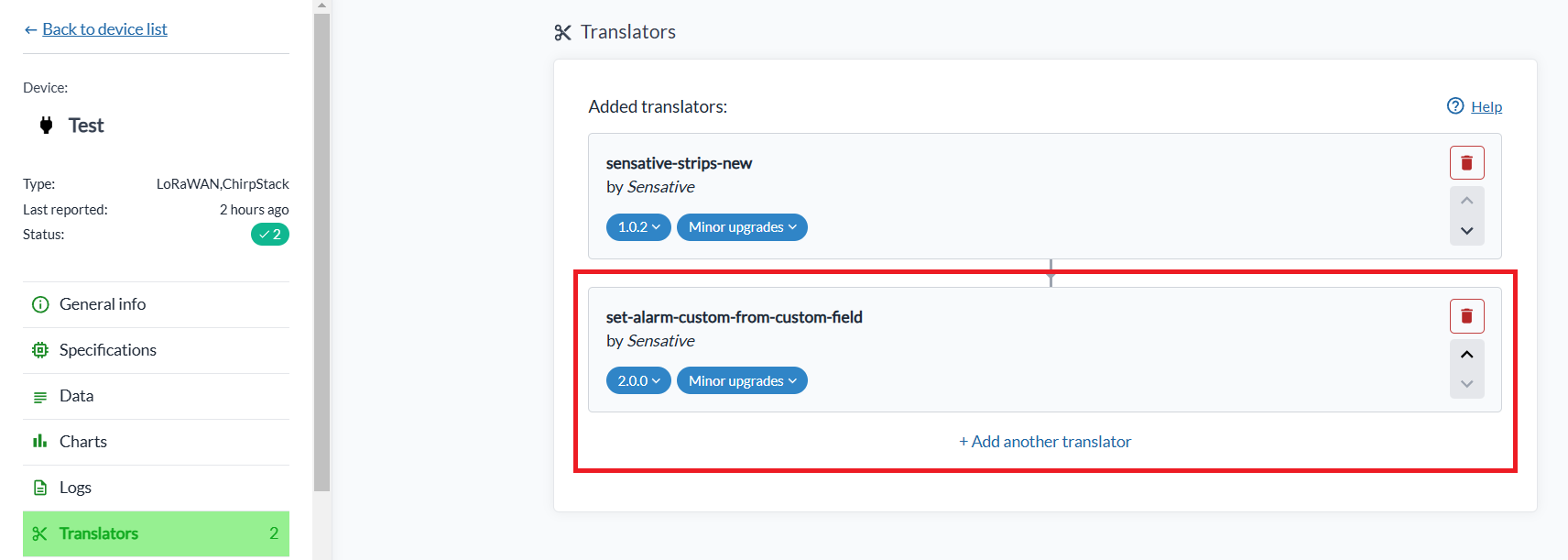
-
Set the parameters on the translator. Most are optional and fall back to a default when left blank, but some are required. The parameter list, with each default where there is one, is shown in the translator's own description in the UI.
-
Wait for the device to send its next report. The alarm fields then appear in the Data section of the device:
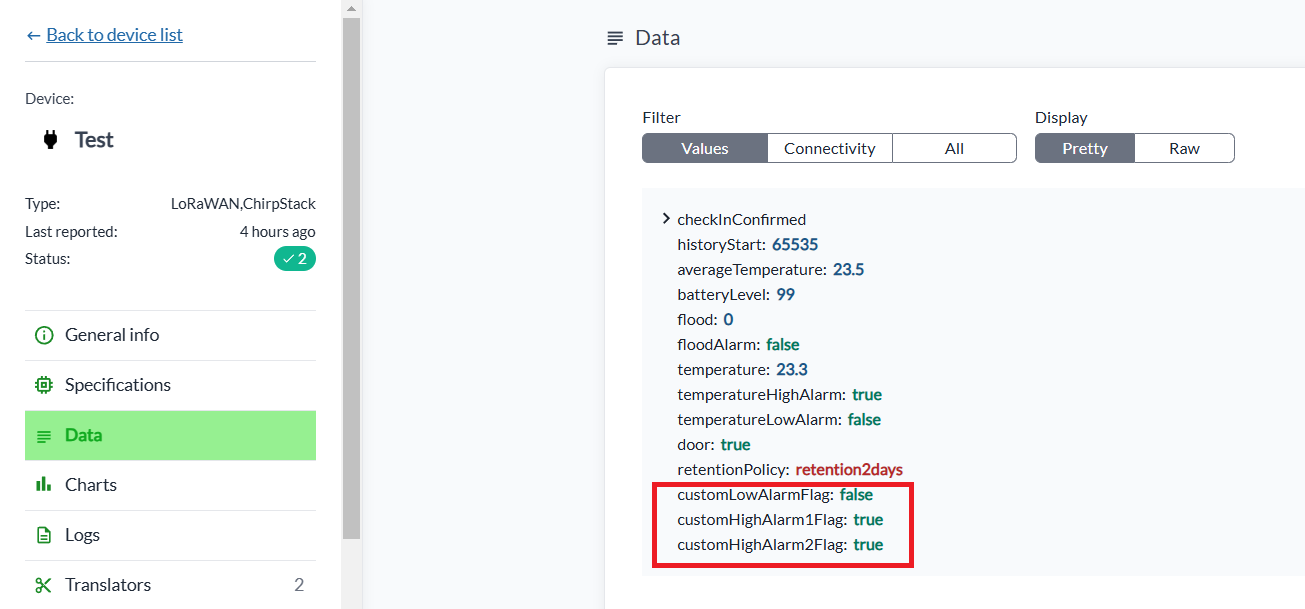
If something is wrong with the setup, for example the source field is missing or a low threshold is above a high one, the translator writes an errorMessage explaining what is incorrect. It appears in the Data section under the All filter.

Adding alarm translators to many devices at once
Alarm translators can be added to, or updated on, many devices in one operation:
- Click Select many in the device list and select the devices.
- In the Select action drop-down, choose Edit translators.
- Click + Add translator and pick the alarm translator.
- Click Confirm to save.
Mold risk detector
set-alarm-mould-risk-from-temperature-and-humidity implements a scientifically proven algorithm that evaluates the risk of mold growth from ambient temperature, relative humidity and a mold risk timer. The principle: if the environment stays favourable for mold growth for long enough, the risk is imminent and the alarm is raised.
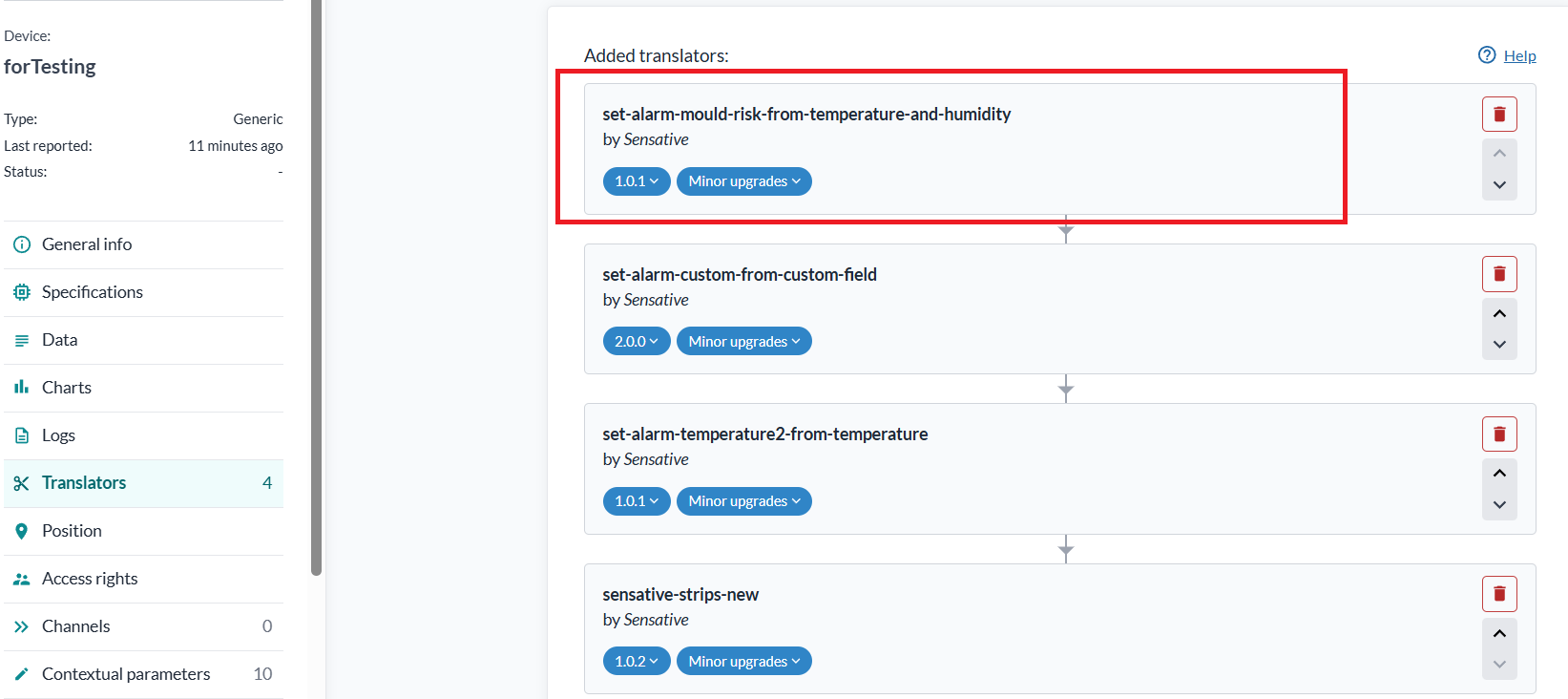
Once the translator is added, three fields appear in the device's Data section after the next report:
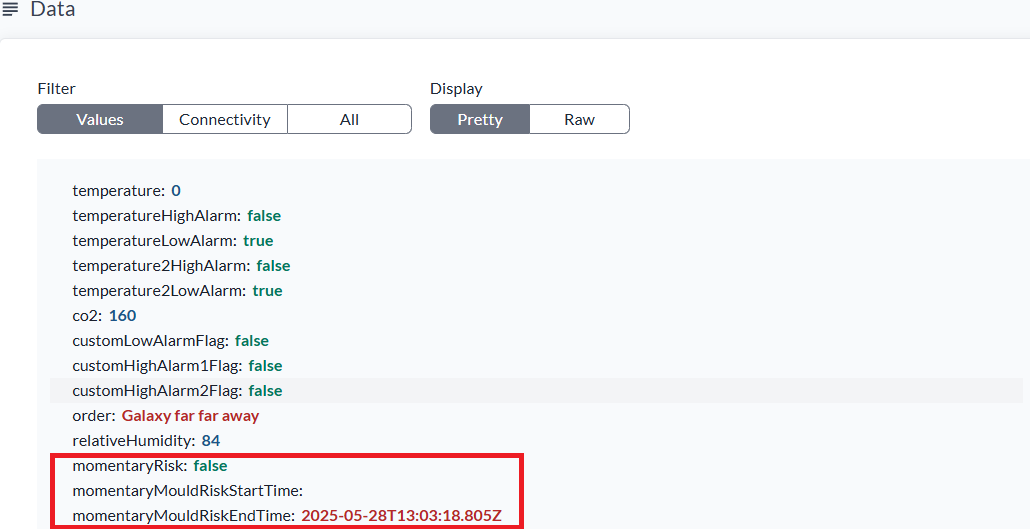
momentaryRisk starts out false and turns true when the combination of temperature and relative humidity rises above the calculated risk threshold, for example above 14 °C and 80 % relative humidity. It indicates that mold could start developing if the condition persists.
Note that momentaryRisk can be true below 14 °C if the relative humidity is abnormally high, since that is still a good growth environment for some moulds.
momentaryMouldRiskStartTime is set when momentaryRisk changes from false to true, and momentaryMouldRiskEndTime when it changes back. If the risk stays clear for four hours, the risk build-up is broken and the timer resets.
When momentaryRisk has been continuously true for 18 days, a fourth field appears, persistentMouldRiskAlarm, with the value true:
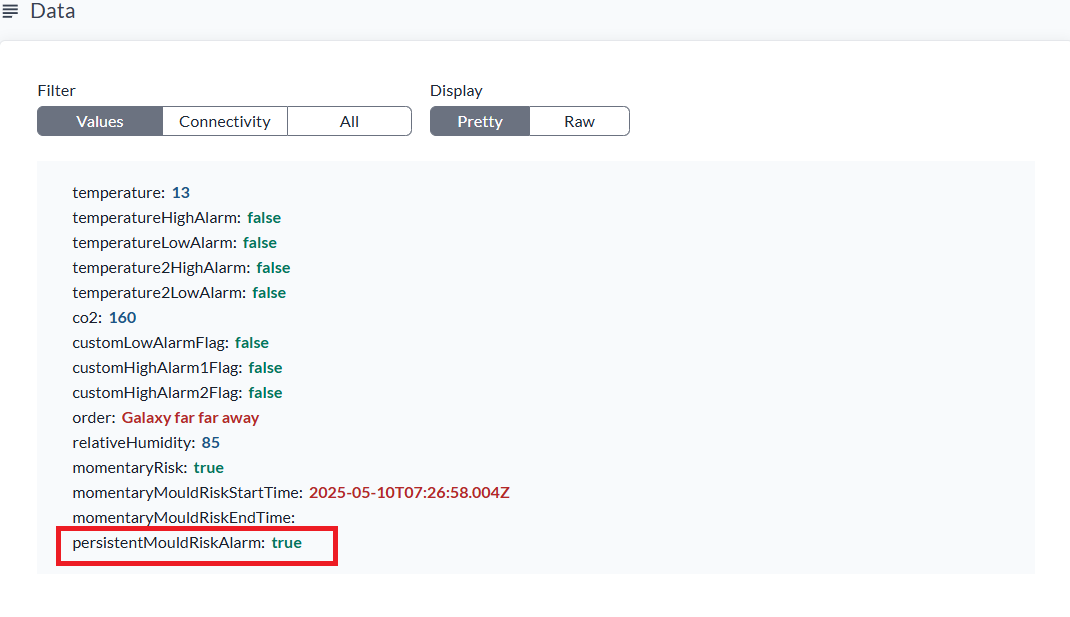
It returns to false once momentaryRisk has been false for four hours in a row, and another 18 days of continuous risk must pass before it is raised again.
All four values are parameters, so the algorithm can be tuned to the building or the climate:
| Parameter | Default | Purpose |
|---|---|---|
temperatureThreshold | 14 °C | At or above this temperature the fixed humidity threshold applies; below it, the effective humidity threshold is lowered proportionally |
relativeHumidityThreshold | 80 % | Humidity above which the room is at momentary risk at warm temperatures |
persistentRiskConfirmDays | 18 | Days the momentary risk must persist before persistentMouldRiskAlarm is raised |
persistentRiskClearHours | 4 | Hours the risk must be clear before the alarm is cleared again |
Seeing the alarms
To build a view that shows the current alarm state across your devices, see Alarm Monitoring View.