Flow control
Flow control decides how execution moves through the graph, rather than what it senses or does. Both blocks here are about timing: one waits, the other waits and then checks.
| Block | What it does |
|---|---|
| Delay | Pauses the branch before continuing |
| Redundancy check | Waits, re-reads a device, and runs the branch again if the device has not confirmed |
Delay
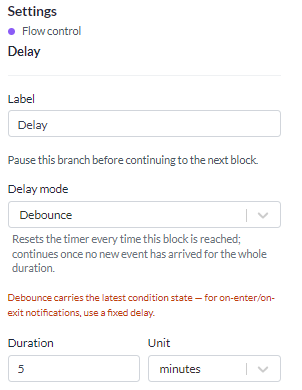
Put a delay between two blocks and everything after it waits.
| Setting | What it does |
|---|---|
| Mode | Fixed or Debounce |
| Duration | A number and a unit: seconds, minutes, hours or days |
The longest wait is 30 days, however you express it.
Fixed
Waits the full duration, then continues. Every event that reaches the node starts its own timer, so five events arriving a minute apart produce five separate continuations.
Use it for a deliberate pause: switch a light on, wait ten minutes, switch it off again.
Because each event gets its own timer, a fast trigger behind a fixed delay piles up pending waits and then releases them in a burst. For anything chatty, use Debounce.
Debounce
Each new event that reaches the node restarts the timer. The branch continues only once the duration has passed with nothing new arriving.
Use it to wait for things to settle. A door sensor that flaps as somebody works in the doorway should produce one message after the movement stops, not one per swing.
Debounce is also the answer to a sensor that reports every few seconds while a value hovers on a threshold.
A delay in front of an action
An action set to On enter or On exit still works behind a delay. The condition's transition is carried across the wait, so the action that fires after the pause is the one the condition asked for.
That is what lets you build "if it is still too warm ten minutes later, tell somebody" without the alert repeating on every report in between.
Redundancy check
Use this when an action is not certain to take effect. A LoRaWAN downlink reaches the device on the first attempt about four times in five, so a rule that switches a streetlight needs a way to notice and re-send.
| Setting | What it does |
|---|---|
| Device | The device to re-read. Empty means the device that triggered the rule |
| Device field, operator, expected value | The check, written like a value threshold |
| Retry interval | How long to wait before each check. At least 5 seconds, at most 30 days |
| Max retries | How many times the blocks after it may run again. At most 20, and 10 if left alone |
How it runs
An incoming connection arms the block, and nothing after it runs at that moment. When the interval has passed the device is read again and the check is tested against its current values.
- The value matches: the effect landed, and the branch stops.
- It does not match: everything connected after the block runs again and the timer restarts, up to the retry limit. After that the rule gives up.
- The device carries nothing at that field: this counts as not matching, so the rule keeps retrying. A field the device has never reported looks exactly like an effect that has not landed. Check the field name in the run history, which records the value read on each attempt.
How to wire it
Because arming runs nothing immediately, connect the trigger to both the action and the redundancy check, and point the redundancy check back at that same action.
Wired in line instead - trigger, then check, then action - the first attempt is delayed by a whole interval. The rule then reads as "wait, then start sending" rather than "send, verify, re-send".
Keep the interval longer than the device's own reporting interval. A device cannot confirm anything before it next reports, so a shorter interval spends the retry budget sending into the gap.
A time-based trigger carries no device, so the Device field has to be filled in there. Left empty it resolves to nothing and every check is dropped.
When the rule fires again mid-check
A check holds one retry budget at a time.
Reports from the device being checked do not disturb it. The device usually reports as a result of the very command being retried. Restarting the count on each of those would mean the retry limit is never reached.
Any other trigger - a scheduled run, or a different device - cannot be the checked device confirming. It therefore starts a new run: the pending check is replaced and the budget starts over. A streetlight rule that gave up last night is retried in full at tonight's sunset.
The retried blocks act on the device that triggered the rule, not the device the check reads. An action addressed to the triggering device goes back to the same device on every attempt.