Conditions
A condition tests the event and splits the flow in two. Blocks wired to the true branch run when the test passes; blocks wired to the false branch run when it does not.
Every condition needs its true branch connected. The false branch is optional, and only one block may be wired to it.
| Condition | What it tests |
|---|---|
| Value threshold | One value against another |
| Date window | Whether today falls inside a calendar window |
Conditions can be chained. Wire one condition's true branch into another condition to require both.
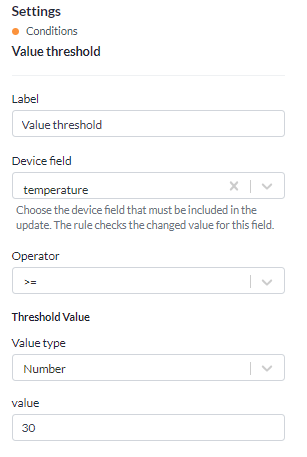
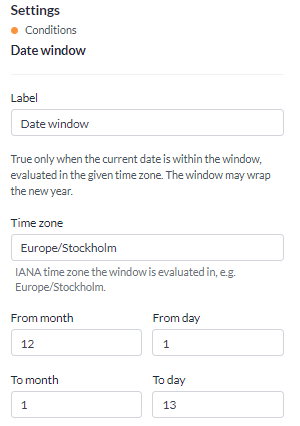
Value threshold
Compares a left operand against a right operand with an operator.
The operands
Each side is one of two things.
- Field path reads a value out of the event, for example
diff.temperatureoriotnode.contextMap.name. - Value is something you type: a number, a text string, true or false, or null.
Most checks put a field path on the left and a fixed value on the right - diff.temperature greater
than 25. Both sides can be paths when you want to compare two of the device's own values.
The two useful roots are:
| Root | What it holds |
|---|---|
diff | The values that changed in this report |
iotnode | The whole device document, including contextMap and the latest value of every field |
diff.temperature is therefore "the temperature just reported", while iotnode.temperature is "the
temperature the device currently holds". For a threshold on a fresh reading, use diff.
Field names are the internal ones. The device's Data tab lists them, and they are the same names used in custom queries and in the device list columns.
The operators
| Operator | True when |
|---|---|
| Equals | The two sides are the same |
| Not equals | They are not |
| Greater than | Left is larger than right |
| Greater than or equal | Left is larger or the same |
| Less than | Left is smaller than right |
| Less than or equal | Left is smaller or the same |
| Contains | Left contains right - a substring in text, a member in a list |
| Does not contain | It does not |
Greater and less than compare numbers as numbers and text as text. Contains works on a string or on a list.
A path that the event does not carry resolves to nothing. For equals, greater than, less than and contains, the comparison then comes out false, so a rule that never fires is often a mistyped path rather than a device that never crosses the threshold.
The two negative operators go the other way. Not equals and Does not contain come out true against a path that is not there, because nothing is not equal to the value you gave. A mistyped path in a not-equals check therefore fires the rule on every event rather than none. The run history shows what the check actually read, in both directions.
Date window
Passes only when the current date falls inside a calendar window.
| Setting | What it does |
|---|---|
| From and To | The window, as a month and a day |
| Time zone | The zone the date is read in |
The window carries no year, so it means the same dates every year. A window that wraps the new year is allowed: from 1 December to 13 January is the period most people would call the holidays.
Put it in front of an action to confine a rule to a season - frost protection between October and April, irrigation between May and September. Combined with a sun event trigger it gives a lighting profile that follows both the calendar and the daylight.
Missing expected report
A Missing expected report condition exists in older rules but is no longer offered in the palette. Use the Missing expected report trigger instead - it starts the rule on the same incident, rather than testing for it after something else has started the rule.