RSMP (Traffic Management)
RSMP, the Road Side Message Protocol, is an open standard for supervising roadside equipment. It comes out of a Nordic cooperation between road authorities, is maintained by RSMP Nordic, and is used beyond the Nordics as well, including in other European countries. Because it is open and vendor-neutral, equipment from any supplier that implements it is supervised the same way.
It is also not specific to one kind of equipment. Traffic light controllers, variable message signs, weather stations, tunnel and barrier equipment are all supervised through the same protocol, each described by its own SXL.
Yggio speaks RSMP as a supervision system. Whatever is connected becomes ordinary Yggio devices: they appear in views, they can be filtered on, they drive rules and reports, and they sit on the map alongside everything else in the estate.
What Yggio decodes today. The implementation covers the traffic light controller SXL (1.0.15): signal groups, detector logics, alarms and aggregated status. Other RSMP equipment types use the same connection and the same protocol, but each needs its own SXL decode before its values arrive named rather than raw. Ask support if you have equipment that is not a traffic light controller.
Setting up a site is three steps: create the RSMP connector, install the controller component, then install the detector logics and signal groups. The connector is one page on its own; the two installation steps are described below.
What a traffic light controller reports
An intersection is one site, and a site contains many parts. Two status messages carry almost everything:
- S0001, signal group status. One character per signal group, describing what that group is showing: green, red, yellow, red-yellow, dark, flashing.
- S0002, detector logic status. One character per detector logic,
1when the detector is occupied and0when it is not.
Both arrive as a single string covering the whole array, not as separate values. A real S0001 from a twelve-group intersection looks like this:
"sCI": "S0001", "n": "signalgroupstatus", "s": "F5F35F5F1F5F"
and a detector logic message from a site with a hundred detectors like this, truncated:
"sCI": "S0002", "n": "detectorlogicstatus", "s": "0100000001100011100000000000..."
Position 2 is a 1, so detector logic 2 is occupied. Everything else in that excerpt is clear.
Fan-out: one position per device
A string is not much use in a dashboard, so Yggio cuts it up. Each component you install claims one position, and Yggio writes only that position's value to that device.
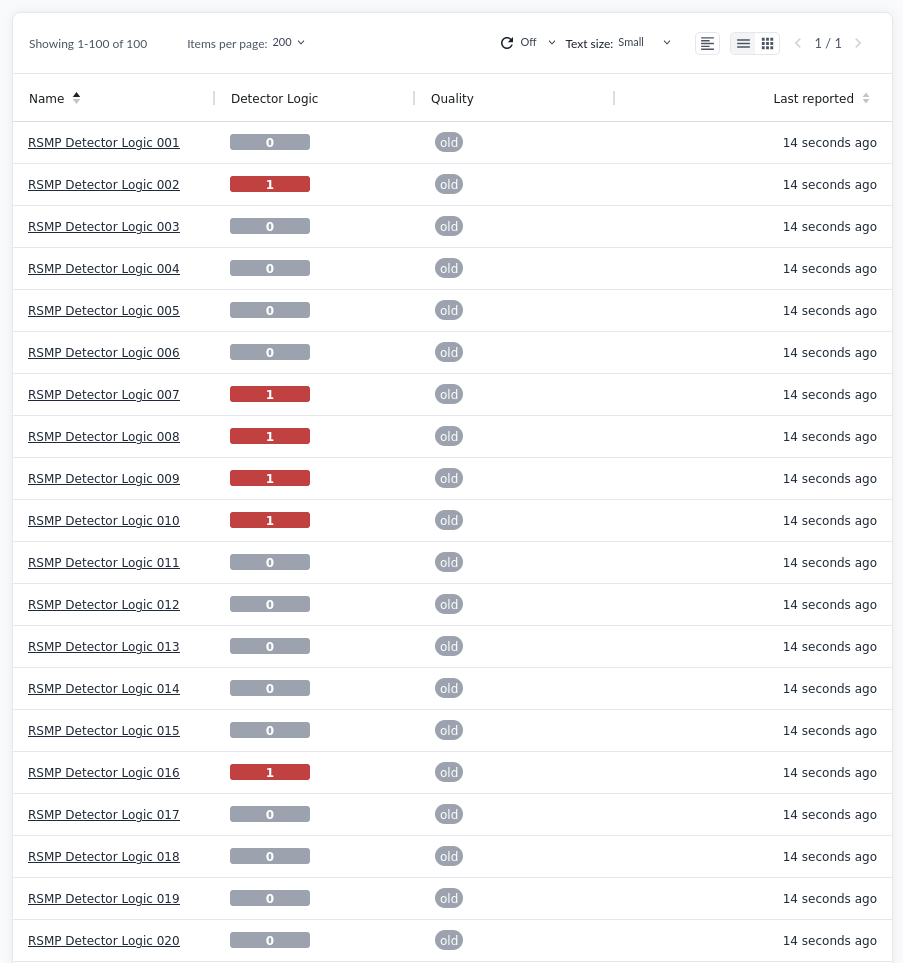
The four roles decide how a component reads the raw status:
| Role | Represents |
|---|---|
| Controller | The controller itself: aggregated status, alarms, connection state |
| Detector logic | One position of S0002 |
| Signal group | One position of S0001 |
| Group | A chosen set of positions, gathered into one device |
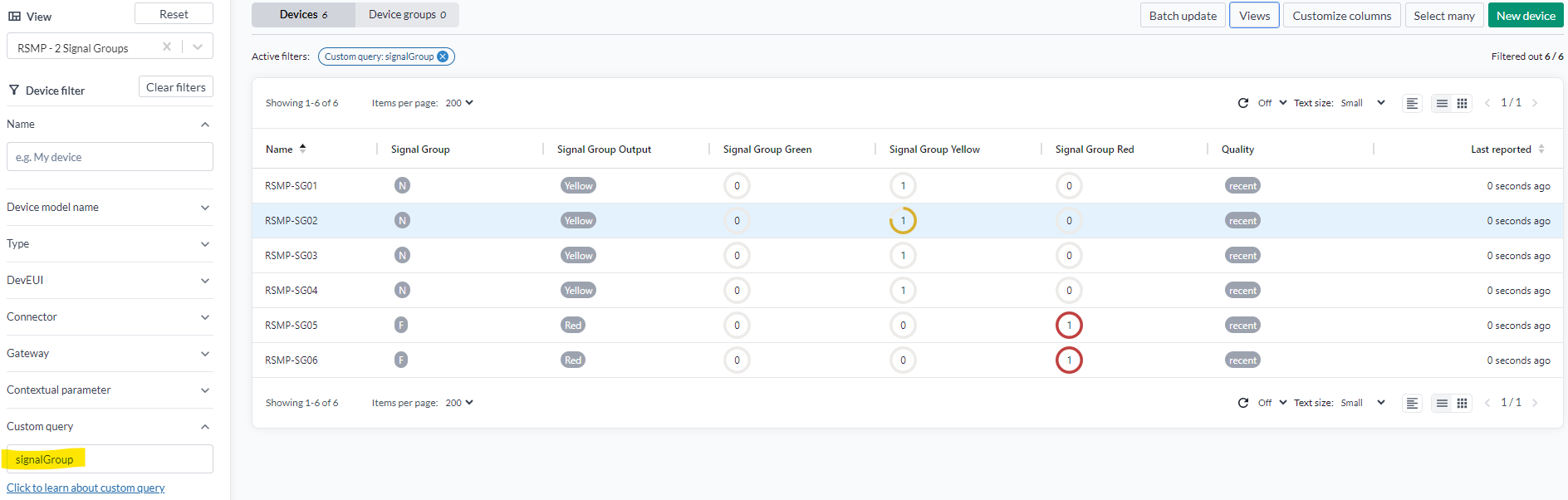
Because each position becomes a device, everything that works on devices works here. A view filtered
on signalGroup gives the state of an intersection at a glance:

For watching detector logics as they happen, the Swimlane widget is an excellent choice. It gives each detector its own lane and scrolls them together, so a vehicle crossing several detectors in sequence is visible as a pattern rather than as separate numbers changing. A detector logic is occupied or not, which makes the lanes easy to read side by side. It is a live view and keeps no history, so use it to watch an intersection rather than to look one up afterwards.
You need the SXL
The SXL, signal exchange list, is the controller's own specification: which detector logic and which signal group occupies which position, and what each one is for. It is an RSMP concept, not a Yggio one, and the site's road authority or controller supplier has it.
Without the SXL, positions are guesswork. This matters more than it sounds, because a component pointed at the wrong position does not fail: it reports a real value from the wrong detector, and it does so convincingly. Confirm at least two positions against the SXL before trusting the rest.
Get it before starting the installation below, not after.
Installing components
Nothing is created automatically. After the connector exists, each component you want in Yggio is installed as a device, from New device with the RSMP device type. The same form is used for all of them; the role is what makes one a controller and the next a detector logic.
Install the controller first, then the detector logics and signal groups.
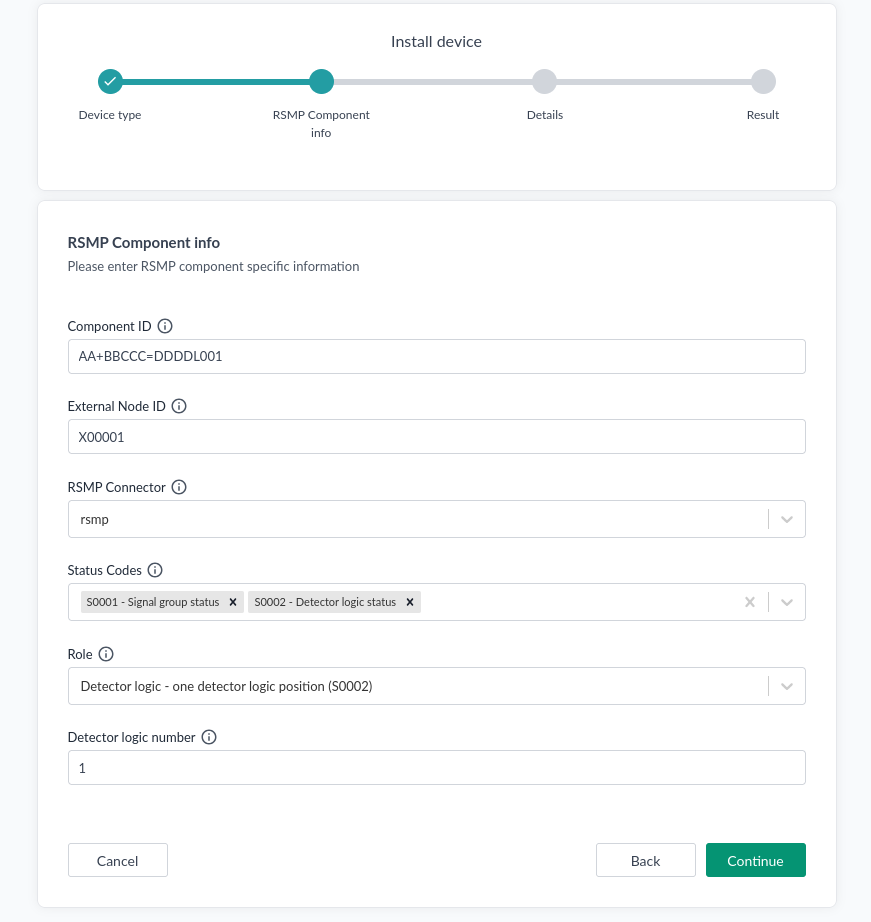
| Field | Description |
|---|---|
| Component ID | The component's identifier in the controller, in SXL form, for example AA+BBCCC=DDDDL001. It must match the controller exactly, and each device needs its own |
| External Node ID | The node identifier, for example X00001 |
| RSMP Connector | The connector for this site |
| Status Codes | Which status messages this component subscribes to: S0001 - Signal group status, S0002 - Detector logic status, or both |
| Role | What this component represents, which decides how the raw status is read |
| Detector logic number / Signal group number | Which position in the status string this device reads, counting from 1. Shown for the roles that need it |
The devices are siblings rather than a hierarchy. A detector logic does not sit underneath the controller device: each one references the connector directly and carries its own component ID. The controller is simply the component whose role is Controller.
Verifying
- Check that the controller connects: the controller component's connection state should be live rather than timed out.
- Install one detector logic and wait for the next status message.
- Confirm its value matches what the SXL says that position should be.
- Compare a second position before trusting the rest, since an off-by-one in the index produces plausible values rather than an error.
When a component misbehaves
It reports nothing. Check that the status code subscription matches the role: a detector logic
needs S0002, a signal group needs S0001. A component subscribed to neither receives no status.
It reports the wrong thing. Almost always the index. Positions count from 1 and are defined by the site's SXL, not by the order the components were installed.
Its values repeat. That is the controller, not Yggio. See repeated values.
Repeated values
The controller sends the whole array whenever anything changes, including the values that did not.
If one detector out of a hundred goes occupied, all hundred positions are sent again, and the
ninety-nine unchanged ones arrive with the same value they had before. A detector logic sitting at
0 can therefore be reported as 0 many times over.
This is normal RSMP behaviour, not a fault, but it matters for anything downstream:
- Yggio suppresses the repeats. Each component's slice is compared against the last value written for it, and an identical repeat is not written again. So the device's history reflects actual changes rather than message traffic.
- Do not count messages as events. A rule that fires on "reported" rather than on a change would fire on every uplink for every position. Trigger on the value changing.
- The timestamps are the controller's. In the example data above, ten status messages arrive within about three and a half minutes, which is the cabinet reporting, not the detectors changing that often.
Freshness
Signal group status carries a quality flag from the controller, and Yggio surfaces it on the
device. In the views above it reads recent on live data and old on stale data.
Treat it as part of the reading. A signal group showing green with quality old is telling you what
it last knew, not what the light is doing now, and an operational view should make that visible
rather than hide it behind the value.
Alarms and aggregated status
Alongside the status messages a controller sends:
- Alarms, each with an alarm code, a state and a timestamp, for example code
A0010moving toinActive. These route to the component they belong to. - Aggregated status, the controller's own summary of its condition.
Both land on the controller component, which is why it is worth installing one even when the detectors and signal groups are what you are really after.