LoRaWAN
LoRaWAN is the most common way devices reach Yggio. It gives kilometres of range and years of battery life in exchange for small payloads sent occasionally, which suits remote monitoring in buildings, cities, agriculture and industry. The radio side is covered under LPWAN.
How the chain fits together
A LoRaWAN reading passes through four hops before it reaches Yggio:
- The device broadcasts over LoRa radio.
- Every gateway in range receives the transmission and forwards it over IP. Several gateways hearing the same message is normal, and gives redundancy at no extra cost.
- The network server deduplicates the copies and handles security, sessions and join.
- Yggio receives the payload from the network server.
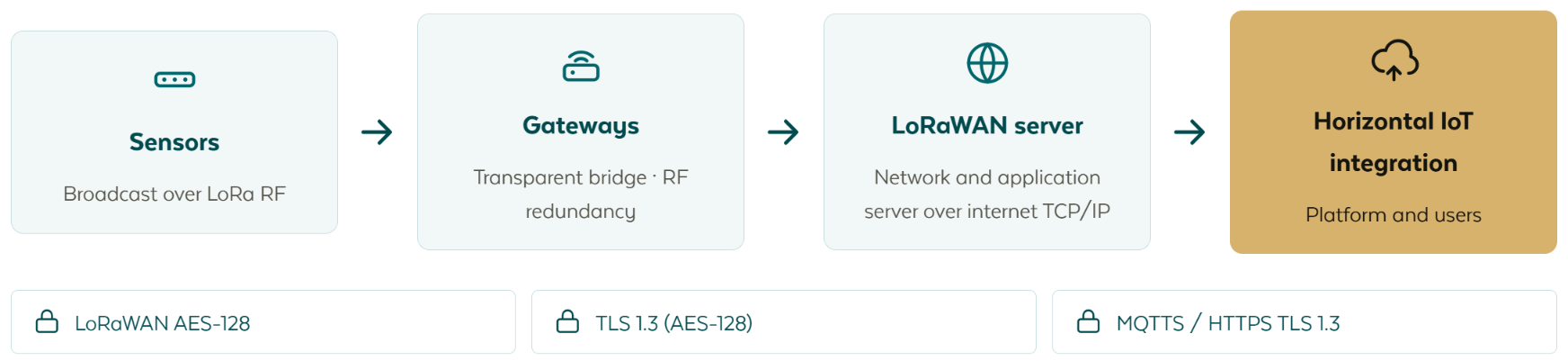
Yggio connects to the network server, not to individual gateways. That is the practical consequence of the chain: whoever runs your network server, whether that is an operator or your own installation, is who Yggio talks to, and gateways never appear in Yggio as a data source.
Choose a connector
One connector per network server. Set it up once, then add every device on that server through it.
| Network server | Connector | Direction | Notes |
|---|---|---|---|
| ChirpStack v3 | ChirpStack V3 | In and out | Open source, commonly self-hosted |
| ChirpStack v4 | ChirpStack V4 | In and out | Open source, commonly self-hosted |
| Netmore | Netmore | In and out | Import, provision, subscribe and delete |
| Actility / Netmore ThingPark | Actility / Netmore ThingPark | In and out | Through the ThingPark DX API |
| Loriot | In the connector picker | In | Receive-only |
| Helium | In the connector picker | In | Receive-only |
| The Things Network (TTN) | In the connector picker | In and out |
Direction is worth checking before you design around it, because not every integration goes both ways. In is the uplink, the device's readings arriving. Out is the downlink, a command from a rule or from the API reaching the device.
Receive-only means Yggio takes uplinks and neither sends downlinks nor provisions devices on that server. Create the device there first, then add it in Yggio.
If the server you use is not listed, contact your support representative. Connectors exist that are not yet in the picker.
Adding devices
Devices are added through the connector rather than one by one against the network server, and the identifiers are the usual LoRaWAN ones, DevEUI and the join credentials. See Single install for one device and Batch install for a spreadsheet of them.
On the connectors that support provisioning, adding a device in Yggio creates it on the network server as well, and deleting it in Yggio can decommission it there. That behaviour is deliberate and can be opted out of at the confirmation dialog. Read the connector's own page before deleting.
After the first uplink
A LoRaWAN payload arrives as a few dozen bytes, so it means nothing until it is decoded. That is the translator's job: it turns the raw payload into named fields, and from that point the device behaves like any other device in Yggio, with the same access rights, history and dashboards.
If a device is provisioned and joined but no data appears, the payload is usually arriving and failing to decode. Logs shows what came in.
Related
- Connectors - all connector types and how connector access works
- LPWAN - the radio and coverage side
- Cellular (NB-IoT and LTE-M) - the other wide-area option, and how it differs