Building automation
BACnet, KNX, Modbus and PROFINET came first, and they still run much of what is installed in buildings and factories. The most useful data in a building is often already there, in a system that was installed long before anyone said the word IoT. Bringing it into Yggio puts it alongside the sensors, with the same fields, access rights, history and dashboards. The protocols themselves are covered under Building automation and industrial protocols.
Four ways in
Which one fits is decided by what the building already has and by what its firewall is allowed to let through, so it is worth settling before anything is installed.
The choice matters because these protocols predate internet-era security models. They were designed for isolated networks, and security is normally provided by the network around them rather than by the protocol. How much of that network has to be opened is the real difference between the four.
Direct BMS integration
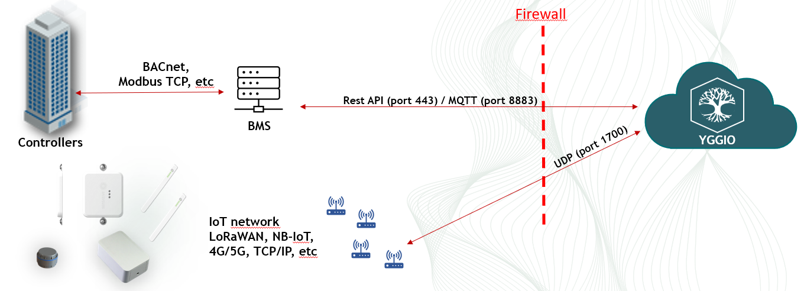
Yggio talks to the building management system, and the BMS keeps talking to the controllers as it always did. Nothing new is installed in the building, and the controller network is never exposed.
This needs a BMS with an API worth integrating against, which is what the vendor-specific connectors further down are.
Integration through an edge gateway
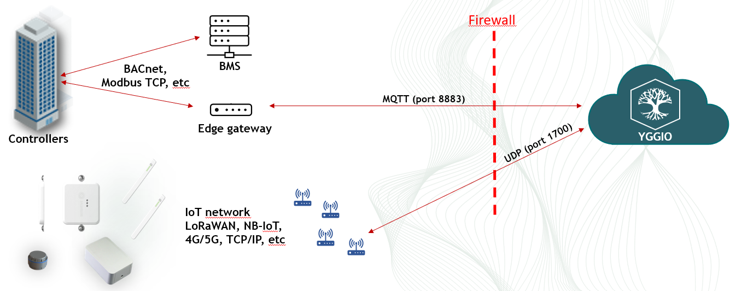
A gateway is installed alongside the BMS, speaks the controller protocols on the inside and one outbound MQTT connection on the outside. It reads the controllers directly, so it does not depend on what the BMS chooses to expose, and the building network still stays closed.
This is the usual choice, and SIA Connect is the gateway Yggio is most often deployed with.
Direct integration to the controller network
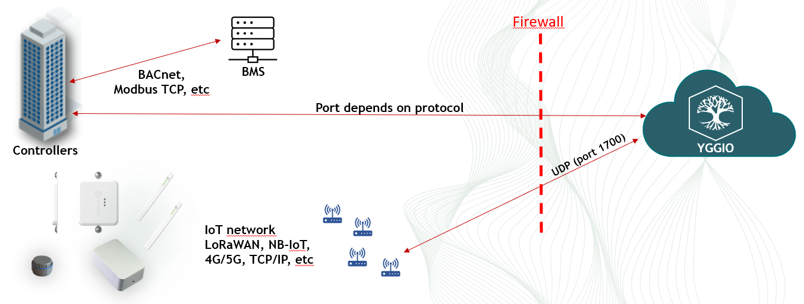
Yggio speaks BACnet or Modbus TCP straight to the equipment, with nothing in between. The BACnet IP and Modbus TCP connectors do this, and they are enabled by support rather than from the connector picker.
It is the shortest path and the most demanding one, since the controller network itself has to be reachable from outside and the port depends on the protocol. Expect the building's network owner to be part of that decision.
Yggio Edge
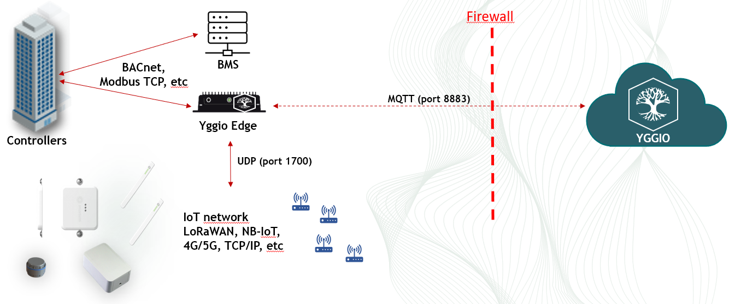
A Yggio instance runs inside the building. It speaks the controller protocols locally and terminates the IoT network locally too, so the sensor traffic never leaves the site either. One outbound MQTT connection carries what should reach the central Yggio.
This is the option for sites that keep data on premises, or that need to keep working when the connection to the outside does not.
What crosses the firewall
In the first three the IoT network reaches Yggio on its own over UDP port 1700, independently of how the building system is integrated. Only Yggio Edge keeps that inside.
| Way in | Outbound from the building | IoT network |
|---|---|---|
| Direct BMS | REST API on 443, or MQTT on 8883 | UDP 1700 to Yggio |
| Edge gateway | MQTT on 8883 | UDP 1700 to Yggio |
| Direct to controllers | Inbound, on the protocol's own port | UDP 1700 to Yggio |
| Yggio Edge | MQTT on 8883 | UDP 1700, terminated on site |
SIA Connect
SIA Connect is the gateway behind the edge-gateway route above. It supports over 30 industrial protocols, holds up to 500 tags, and works in both directions: readings come up, commands and setpoints go down.
The protocols it covers include:
- BACnet IP and BACnet MS/TP
- Modbus TCP, Modbus RTU and Modbus RTU over TCP
- Beckhoff TwinCAT ADS
- M-Bus and Wireless M-Bus
- OPC-UA, as client or server
Each tag configured in the gateway becomes a device in Yggio, created automatically on its first message. That is what makes the integration scale: the mapping work happens once, in the gateway, and Yggio follows.
Commissioning one is a project rather than a form to fill in, and it is documented separately in SIA Connect, which covers VPN access, hardware installation, tag naming, trigger behaviour, the per-protocol configuration, forwarding templates, write-back of setpoints, watchdogs and troubleshooting.
Vendor-specific systems
Where a BMS exposes its own API, the integration goes through that instead of through a gateway:
- Delta Controls - through the EnteliWeb REST API
- Siemens Desigo CC - Yggio provides sensor data to Desigo CC through its REST API, so this one runs outwards rather than inwards
- Elvaco CME - multi-sensor data over HTTP, using Elvaco spec
3108
These are set up with support. See Connectors for the full list.
Related
- SIA Connect Connector - the connector settings
- SIA Connect - the full commissioning guide
- Building automation and industrial protocols - what the protocols are