Data Marketplace
The Data Marketplace is a platform where you can find and share data from various sources. It allows you to explore, discover, and access a wide range of datasets that can be used for analysis, research, and development.
The Data Marketplace provides a user-friendly interface to browse through different datasets, view their details, and access them for your projects. You can also contribute your own datasets to the marketplace, making them available for others to use.
Each listing belongs to one of three project types, chosen as the first step when you create it:
Basicfor lightweight listings with metadata, tags, links, and images.- Two extended project types, each built from structured sections such as area, intervention, stakeholders, living labs actors, assessment tools, data processors, datasets, KPIs, and publications. The sections available depend on which of the two you choose.
The marketplace is only shown to users with Data Marketplace access enabled on their account.
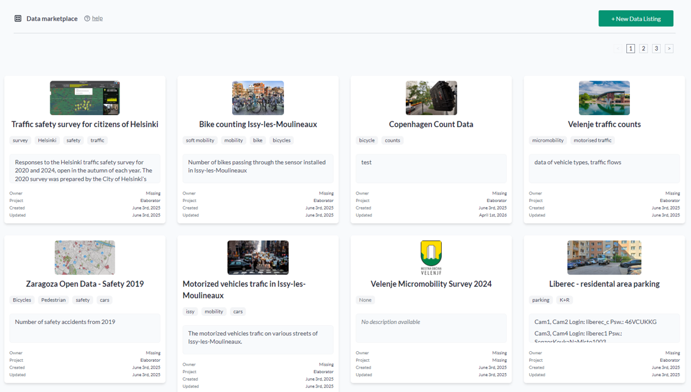
Data Marketplace List Page
The list page shows all available data listings and includes a filter sidebar.
The current filters depend on the selected project:
- All projects:
Project,Name,City, andTags Citymatches part of the listing city or any of its dataset cities, ignoring case; basic listings have no city, so a city filter hides them and thebasicproject does not show the filter- The extended project types add filters of their own, such as
Area,Intervention type,Data processor,Datasets, andKPIs - Every filter except
ProjectandTagsshows, in brackets, the total for the selected project: listings next toName, and distinct cities, areas, intervention types, data processors, datasets, or KPIs next to their filters; the counts stay the same while you filter - A line under the heading sums up the selected project, for example
7 listings · 6 datasets · 10 KPIs; underAll projectsit gives the totals across all projects
Each card includes the listing image or icon, tag chips, a short description preview, owner, project, timestamps, and project-specific summary information.
Use + New data listing to start the creation flow. The first step is always to choose the project type. After that:
Basicguides you through details, images, links, confirmation, and result.- Either extended type lets you select which sections to include, and then complete only those sections.
Data Marketplace Details Page
The details page shows the full listing metadata for the selected project type. At the top of the page you can see:
- listing name and icon
- owner
- created and updated timestamps
- full description
- tags
Below the header, the page shows the sections that are populated for the selected listing. Depending on the content, this can include intervention details, associated-data summary cards, datasets, KPIs, stakeholder information, publications, and other linked records.
Links and images are shown in dedicated sections, and the details page also provides Edit and Delete actions for maintaining the listing.
In the links step of the creation flow and the Links tab of the editor, each link has Edit and
Remove actions. Edit loads the link into the display-name and URL fields and replaces it in place
when you press Save; Cancel discards the change. A link URL must include its scheme, for example
https://example.com.
On the extended project types, the listing title or name and the city are required. If either is
empty, saving the listing reports which field is missing instead of silently refusing. Both are
marked as required on the Details tab.
Swagger And API Reference
For integration work, use the Yggio Swagger documentation. The Data Listings endpoints document the same project-based payloads that the marketplace uses in the UI:
GET /api/data-listingsGET /api/data-listings/{id}POST /api/data-listingsPUT /api/data-listings/{id}DELETE /api/data-listings/{id}
The Swagger reference is available from the Yggio API documentation and is the best place to inspect the latest request and response formats.