Custom query
A custom query filters devices on their own values, for conditions the ordinary filters cannot express - every device reporting a temperature below 15, say. It is available wherever devices are filtered: the device list, the map, the views built on them, and reports, where it decides which IoT nodes the report covers.
Skip to Ready-made queries if you want something to copy and adapt.
Where to type one
In the device list and on the map
- Press Filter above the device list.
- In the panel that opens on the right, go to Custom query and type the query in the box.
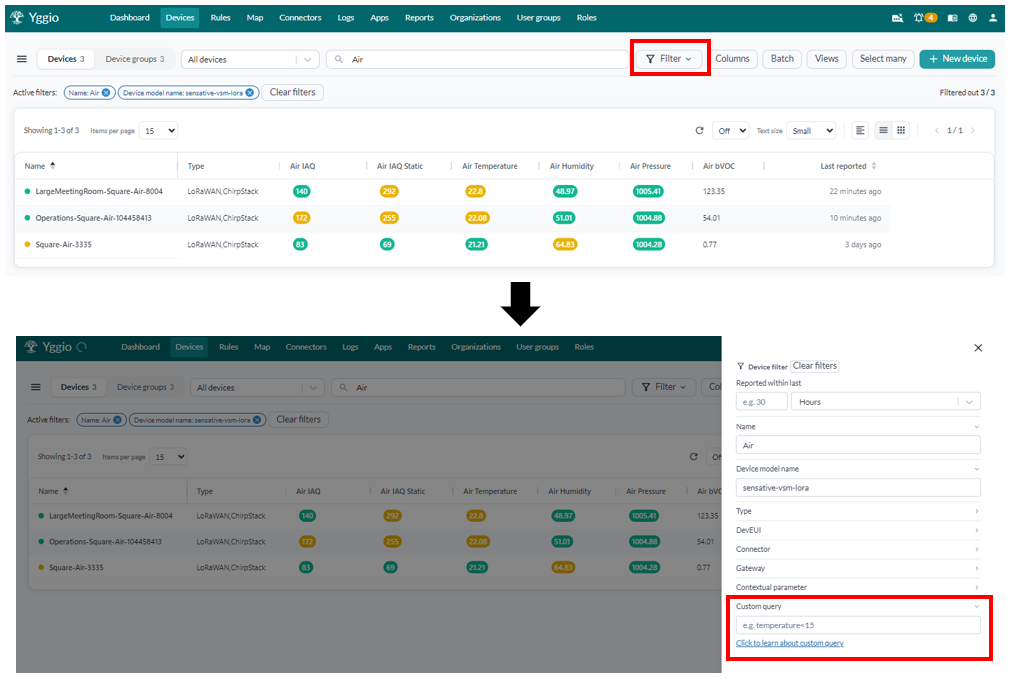
The box carries an example as its placeholder, temperature<15, and a link to this page. The query
applies as an active filter alongside the ordinary ones, so it can narrow a selection the other
filters have already made.
In a report
A report uses the same query to decide which IoT nodes it covers, but it is written into the report
definition rather than typed into a panel. Each source in the definition has a query field, and it
takes exactly the syntax described on this page:
| In a report definition | The report covers |
|---|---|
"query": "rssi" | Every device reporting a signal strength |
"query": "presence" | Every device reporting presence |
"query": "contextMap.building=='Building 2';temperature" | Devices in one building that report a temperature |
A single bare field name is the most common form, because a report usually wants every device that measures the thing being reported on. Anything else on this page works there too, which is how a report is narrowed to one building, one floor or one device model. See Reports for where the definition lives.
Operators
| Operator | Matches | Works on | Example |
|---|---|---|---|
== | Exactly equal | text, numbers, dates, booleans | name=='My Device' |
: | The same as == | text, numbers, dates, booleans | name:'My Device' |
~= | Contains, anywhere in the value | text | name~=Strips |
!= | Not equal | text, numbers, dates, booleans | name!='My Device' |
> | Greater than | numbers, dates | temperature>20 |
>= | Greater than or equal | numbers, dates | temperature>=20 |
< | Less than | numbers, dates | temperature<20 |
<= | Less than or equal | numbers, dates | temperature<=20 |
! | The field does not exist | any | !temperature |
| (field alone) | The field exists | any | temperature |
Case sensitivity
The two behave differently, which is worth knowing before a query comes back empty:
~=ignores case.name~=stripsfinds "Strips-Guard" as well as "strips-guard".==and!=do not.name=='strips-guard'will not match "Strips-Guard".
So ~= is usually the friendlier operator for names typed by hand.
Combining conditions
| Character | Meaning | Example |
|---|---|---|
; | AND - every condition must hold | temperature>25;humidity<40 |
| | OR - either condition may hold | temperature>25|humidity<40 |
, | A list of values for one field | deviceModelName==strips,presence |
. | A nested field | contextMap.floor==3 |
Two things to watch:
- The comma is not a general OR. It lists alternative values for the field in front of it.
deviceModelName==strips,presenceis right;temperature<15,humidity<50is not, because those are two different fields. That one needs the pipe:temperature<15|humidity<50. - Use one OR group per query. A query can mix
;and one|group, as indeviceModelName==strips;temperature>25|humidity<40. A second OR group replaces the first rather than adding to it.
Text values
Wrap a value in single quotes to keep it a literal string: name=='Room 2'. This matters when the
value could be read as something else - a value like 2026-09-01 becomes a date unless it is
quoted, and 0102 becomes the number 102.
Quotes are required when the value contains a space.
Searching on dates
Any value written as an ISO 8601 date is treated as a date by every operator except ~=. That makes
the comparison operators work on time:
| Query | Finds |
|---|---|
reportedAt>2026-09-01 | Devices that have reported since 1 September 2026 |
reportedAt<2026-09-01 | Devices whose last report was before that date |
reportedAt>=2026-09-01T08:00:00Z | From a particular time, UTC |
reportedAt>2026-09-01;reportedAt<2026-09-08 | Reported during that week - a range is two conditions, not one |
!reportedAt | Devices that have never reported at all |
Accepted forms are ordinary ISO 8601: 2026-09-01, 2026-09-01T08:00:00Z,
2026-09-01T08:00:00.000Z. A date on its own is midnight at the start of that day.
Three things to know:
- A range takes two conditions joined by
;, one for each end. ~=does not work on dates. It keeps a date-like value as literal text, so it matches the characters rather than the moment.- A bare year is a number, not a date.
reportedAt>2026compares against the number 2026 and finds nothing. WritereportedAt>2026-01-01.
Dates are absolute, so a saved view containing one keeps pointing at the same moment as time passes. For devices that have gone quiet, a rolling window is usually what you want instead: the device list's Reported within filter, or the map's Last seen section.
Ready-made queries
Copy one and change the field or the value.
Finding devices
| Query | Finds |
|---|---|
name~=strips | Every device with "strips" in its name, in any capitalisation |
name~='Room 2' | Names containing "Room 2" |
deviceModelName==strips-guard | One hardware model |
deviceModelName==strips-guard,strips-drip | Either of two models |
!name | Devices with no name set |
devEui~=0102 | A partial DevEUI, useful from a label |
Readings and thresholds
| Query | Finds |
|---|---|
temperature>25 | Too warm |
temperature<15|humidity>70 | Too cold or too damp |
temperature>=18;temperature<=24 | Inside a comfort band |
temperature<0 | Below freezing |
humidity>70;temperature>22 | Warm and damp together, the mould risk |
co2>800 | Very poor air quality |
occupied==true | Currently occupied |
doorOpen==true;temperature<5 | A door left open in the cold |
Battery and health
| Query | Finds |
|---|---|
batteryLevel<20 | Needs a battery before long |
batteryLevel<5 | Needs one now |
!batteryLevel | Devices not reporting a battery level at all |
Network quality
The fields behind the network coverage map.
| Query | Finds |
|---|---|
rssi<-115 | A weak signal |
rssi<-124 | A signal at risk |
snr<0 | Below the noise floor, with no margin |
spreadingFactor>=11 | Slow and expensive on battery, whatever the signal |
spreadingFactor>=11;rssi>-110 | Close to the gateway yet still transmitting expensively |
!rssi | Devices with no LoRa signal, so not LoRaWAN |
Time
| Query | Finds |
|---|---|
reportedAt>2026-09-01 | Reported this month |
reportedAt<2026-08-01 | Nothing since July - probably dead |
reportedAt>2026-09-01;reportedAt<2026-09-08 | Reported during one week |
!reportedAt | Installed but never heard from |
Metadata
Your own contextual parameters, which is why filling them in at installation pays off.
| Query | Finds |
|---|---|
contextMap.floor==3 | Everything on floor 3 |
contextMap.building=='Building 2' | One building |
contextMap.installer==Olof | Everything one person installed |
contextMap.room~=meeting | Rooms with "meeting" in the name |
!contextMap.floor | Devices where nobody recorded the floor |
contextMap.floor==1,2,3 | Floors 1, 2 or 3 |
Putting them together
| Query | Finds |
|---|---|
contextMap.building=='Building 2';temperature>25 | Too warm, in one building |
deviceModelName==strips-guard;batteryLevel<20 | One model, due a battery |
contextMap.floor==3;rssi<-115 | Weak coverage on one floor - the signature of a bad gateway placement |
temperature;!humidity | Devices reporting a temperature but no humidity, usually a translator problem |
contextMap.building=='Building 2';reportedAt<2026-08-01 | Devices in one building that have gone quiet |
If a query returns nothing
| Check | Why |
|---|---|
| The field name, character for character | Field names are case-sensitive. Copy them from the Data section of a device - see Data |
Whether you used == on text | == is exact and case-sensitive. Try ~= |
| Whether a value needs quotes | Anything with a space does, and so does anything that could be read as a number or a date |
| Whether you meant a comma or a pipe | A comma lists values for one field; a pipe ORs two conditions |
| Whether the field is a string | A number stored as text does not answer > and <. The colour in Data tells you the type |