AI Assistant
The AI Assistant is a natural-language chat backed by the MCP (Model Context Protocol) server. Claude (Anthropic) and OpenAI are currently supported.

Once you have created an AI Connector with type MCP, press the highlighted icon in the navigation bar to open the AI Assistant chat. Connectors with type Agent are not usable in the chat.
What it can do
- Documentation Q&A: answers "how do I..." questions from the Yggio documentation.
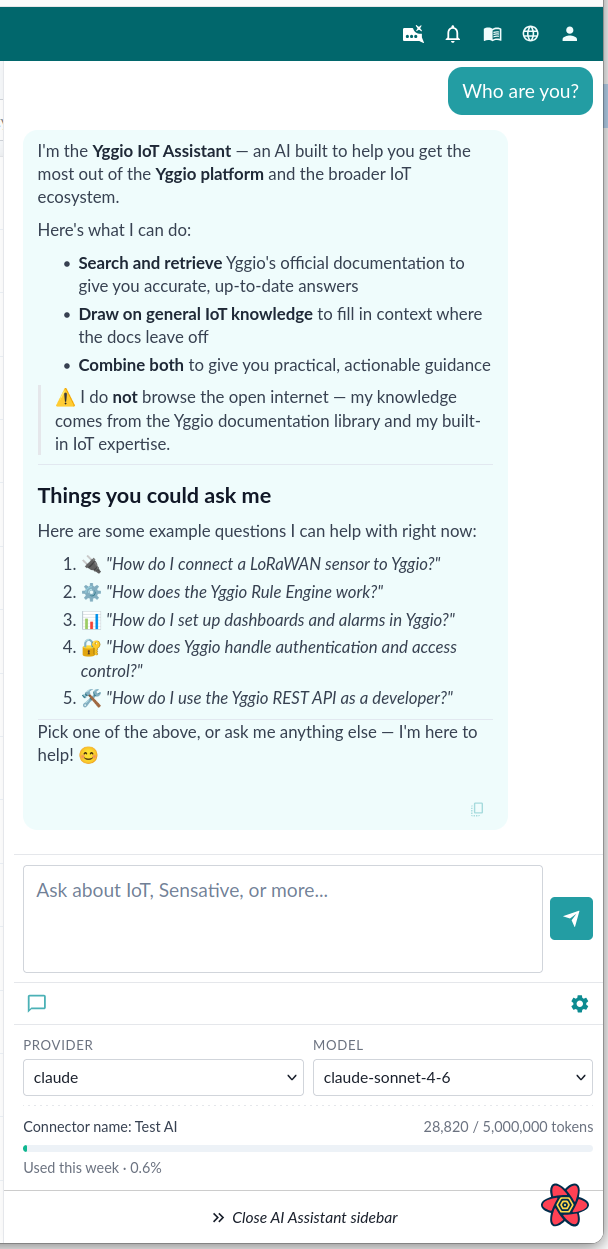
Cost and the weekly token limit
You supply the API key, and the tokens are billed to your own account with Anthropic or OpenAI. Sensative is not responsible for that cost. Set a spending limit on the key itself as well as the limit below.
Every MCP connector has a weekly token limit, set when you create it:
| Default | 5 million tokens per week, per connector |
| Minimum | 1 million |
| What counts | Every billable token in a turn: what you send, what is read from cache, and what comes back |
| When it resets | Sunday 00:00 UTC |
| Where to change it | The Weekly Max Tokens (millions) field on the AI connector, entered in millions |
The create form will not save until you have acknowledged both the limit you set and that the cost is yours. When a connector reaches its limit, its chat stops answering until the counter resets.
A single question is also capped at 8192 characters, so paste extracts rather than whole files.
Two things reduce token use. Ask one question per turn, since each turn resends the conversation so far. Start a new chat when you change subject, for the same reason.
Writing a good prompt
The assistant answers from the documentation, so it does best on questions the documentation could answer. Name the thing you are working with, say what you are trying to achieve, and ask for steps.
| Instead of | Ask |
|---|---|
| "MQTT?" | "How do I connect a device that reports over MQTT?" |
| "It does not work" | "My ChirpStack connector shows no data. What should I check first?" |
| "Explain dashboards" | "How do I build a dashboard showing temperature for ten devices?" |
Prompts worth trying
Getting started:
- "How do I add a device that reports over MQTT?"
- "How do I add an NB-IoT device?"
- "Which connector should I use for a LoRaWAN device on ChirpStack?"
- "Walk me through installing a single device in the field."
Building things:
- "How do I create a dashboard, and which widget shows a value over time?"
- "How do I set up a scheduled report and have it emailed?"
- "How do I create a view in the device list and share it?"
- "How do I place devices on a floor plan?"
Understanding the platform:
- "How many translators does Yggio support, and how do I find the one for my sensor?"
- "What is the difference between a role and an access right?"
- "What does the peek access level do?"
- "How do I give a contractor access to one building's devices only?"
Troubleshooting:
- "A device has stopped reporting. Where do I look?"
- "What do the columns in the Logs page mean?"
- "How do I see the raw payload a device sent?"
Note: the assistant answers from the documentation, not from your data. It can tell you how to build a report; it cannot tell you what last month's readings were.