Roles
A role says what a user may do at all. Access rights say which resources they may do it to. A user with the Editor role and no access rights still sees nothing; a user with access to every device and the Viewer Basic role can look but not touch.
| Answers | |
|---|---|
| Roles | What a user is allowed to do at all |
| Access rights | Which resources they can reach, and at what level |
| User groups | Who gets those access rights together |
A role applies to the whole platform, not to one resource. Every user has exactly one, either a preset or a custom role.
The preset roles
| Role | What it allows |
|---|---|
| Admin | Everything: create, read, update, delete and manage, on every resource |
| Editor | Read and change, but not create or delete. Read-only on access rights. No access to roles |
| Installer | Read everything. Change devices, create device serials and channels. No access to roles |
| Viewer Full | Read-only. The whole interface except Organizations and User groups |
| Viewer Standard | Read-only. Dashboards, the device list and the map |
| Viewer Basic | Read-only. Dashboards only |
Editor
Editor can fetch and change resources, but not create or delete them. In API terms that is GET, PUT and PATCH but not POST or DELETE. Access rights are read-only for an Editor, so they can see who has access to something without being able to change it.
Installer
Installer is built for the person standing in front of the hardware. Beyond read-only access to the rest of the platform, it allows:
- changing devices, which is what the Device Updater does;
- creating device serials, which is what installing a device does;
- creating channels, so an installer's tools can subscribe to the device they just mounted.
The three viewers
All three viewer roles have identical permissions - read-only on everything except roles. They differ only in how much of the interface is shown.
| Dashboards | Devices, Map | Connectors, Logs, Apps, Reports | Organizations, User groups | |
|---|---|---|---|---|
| Viewer Basic | yes | no | no | no |
| Viewer Standard | yes | yes | no | no |
| Viewer Full | yes | yes | yes | no |
Pick the narrowest one that covers what the person needs to see. Viewer Basic suits somebody who should watch a dashboard on a wall and nothing else.
Custom roles
A custom role is built by picking resources and, for each, the actions allowed on it. Use one when none of the presets fits - a contractor who may create reports but nothing else, say.
Give the role a name, add the resources it covers, and choose the actions per resource. (*) All resources covers everything in one entry.
The five actions
The actions are the HTTP methods of the API, so a custom role is really a list of which API calls the user may make.
| Action | Method | What it usually means |
|---|---|---|
| Get | GET | Read it, and list it |
| Post | POST | Create a new one |
| Put | PUT | Replace an existing one |
| Patch | PATCH | Change part of an existing one |
| Delete | DELETE | Remove it |
Editing is split between the two write methods depending on the resource: devices, connectors and
calculations are saved with PUT, geofences and device groups with PATCH, dashboards with both.
Grant Put and Patch together for anyone who should be able to edit, or some screens will save and
others will refuse.
What each resource covers
Each entry in the picker guards a group of API endpoints. The Swagger tag is the heading to look under in the Swagger UI.
| Picker entry | API endpoints | Swagger tag |
|---|---|---|
| (*) All resources | Everything below | - |
| Access | /access-rights | AccessRights |
| App | /apps | Apps |
| Basic Credentials Set | /basic-credentials-sets | BasicCredentialsSets |
| Calculation | /calculations | Calculations |
| Channel | /channels | Channels |
| Connector | /connectors, /vyer | Connectors |
| Dashboard | /dashboards | Dashboards |
| Data Listing | /data-listings | Data Listings |
| Device | /iotnodes, /jobs, and the Sensative VSM endpoints /almanac-fleet-jobs, /app-upgrade-jobs, /vsm-apps | Iotnodes, Jobs, AlmanacFleetJobs, AppUpgradeJobs, VsmApps |
| Device Group | /device-groups | Device-groups |
| Device Serial | /device-serials | Not in Swagger |
| Flow | /flows | Flows |
| Geofence | /geofences | Geofences |
| Image | /images | Images |
| Location | /locations | Locations |
| Log | /logs | Logs |
| Organization | /organizations | Organizations |
| Report | /reports, including report schedules | Reports |
| Reserved MQTT Topic | /reserved-mqtt-topics | ReservedMqttTopics |
| Roles | /roles | Roles |
| Rule Engine | /rules-v2 | Rules |
| Rules | /rules, the legacy engine | Not in Swagger |
| Translator | /translators | Translators |
| User | /users | Users |
| User Group | /usergroups | Usergroups |
Device covers more than the device list. The bulk device jobs are guarded by Device, and so are
Almanac Fleet and
App Upgrade, which work only with Sensative VSM sensors. A role
granting Device POST therefore also allows starting a fleet-wide almanac push or app upgrade.
Combinations that work
| The person | Give them |
|---|---|
| Watches a wall dashboard | Dashboard GET, Device GET |
| Installs devices in the field | Device GET PUT PATCH, Device Serial POST, Channel POST, Location GET |
| Builds dashboards for others | Dashboard all five, Device GET, Data Listing GET |
| Runs reports monthly | Report all five, Device GET |
| Maintains rules | Rule Engine all five, Device GET, Calculation GET |
| Manages who sees what | Access all five, User GET, User Group all five |
| Integration service account | Device GET PUT, Channel GET POST DELETE |
Device GET recurs in almost every row. Dashboards, reports, rules and calculations all present
device data, so a role that grants only its own resource shows empty widgets and reports with no
rows.
Combinations that do not work
- A role without access rights reaches nothing. The role permits the API call; the access right decides which resources the call returns. Both are needed, every time.
- Views and Report Schedule are in the picker but guard no endpoints. Granting them has no effect. Report schedules are covered by Report.
- Put without Patch, or the reverse, half-works. Which one a screen uses depends on the resource, as above, so grant both.
- Access
POSTwithout admin on anything still shares nothing. Access rights can only be granted on resources the user holds admin on, whatever their role says. Owners qualify because ownership carries every scope. - Roles
POSTgrants administrator-level control, because a user who can write roles can raise their own. - Device Serial has only a create endpoint. Get, Put, Patch and Delete on it do nothing.
Note: none of the presets except Admin includes Roles. A custom role is the only way to grant role management without granting full Admin.
Assigning a role
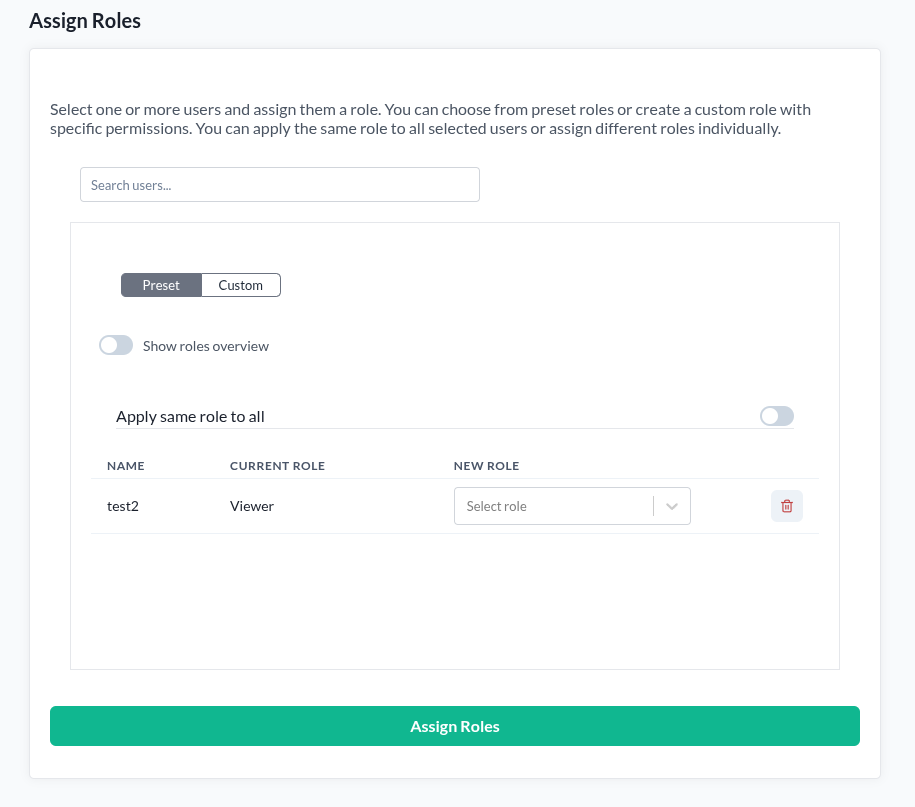
The Roles page is available to organization owners. If you do not own an organization, the page reports that you do not have permission to open it.
- Open Roles.
- Search for and select the users to assign. Several can be selected at once.
- Choose Preset and pick a role, or Custom and build one.
- With several users selected, Apply same role to all gives them all the same role. Leave it off to set each user's role individually.
- Press Assign roles.
Each user's current role is shown beside them, so you can see what you are changing before you change it.
Roles inside an organization
An organization member's role is also shown and set on their row in the Organization Manager. That is the same platform role, reached from a different page, and it is subject to its own rules about who may change whose.