Lesson 3.7 Translator development
A translator decodes a device's raw payload into the IoT platform's flat, canonical
data model - turning TempC_SHT or a hex blob into temperature, °C. In the
earlier lessons you used translators; in this one you'll build, test and
upload your own.
The full reference (data-model rules, complete templates, tooling) is the developer guide Translator Development and the Translator API. This lesson walks you through it hands-on.
Before you start
- Access to your server's Swagger UI (
https://staging.yggio.net/swagger) to upload the translator and attach it to a device. - Node.js installed if you want to run the local test harness.
- Basic JavaScript.
Exercise 1 - Why the data model matters
Open the data-model field table
and note how the same measurement always has the same field name, unit and
quantity - temperature (°C), relativeHumidity (%), batteryVoltage (V).
This is what lets one alarm, dashboard or Grafana panel work across every device.
The golden rule: map a device's raw names to these canonical names - never
invent a new spelling.
Exercise 2 - Build and test a translator
- Copy a template from
Translator Development - start with
Template 1 (wrap a manufacturer reference decoder) or Template 2 (decode a
byte spec yourself). Many vendor decoders read the payload as a Node
Buffer(buf.readInt16BE(...)) - the guide includes aBuffervariant for that common case. - In the
translatefunction, map the decoder's raw output to canonical fields as the final step, converting units (e.g.mV → V,hPa → Pa). - Test it locally with the harness (
translator-harness.js): put your function intranslate.js, add a real payload and expected output to theCASESarray, then runnpm install lodash && node translator-harness.js. Green = the sandbox will run identical logic.
Exercise 3 - Write a clear description
The description is what a user reads in the IoT platform to decide whether your translator
fits - write it well:
- Start with one plain-language sentence: what the device is (hardware), or what it computes (chained / analytics).
- Add a
### Decoded outputlist -`fieldName` (unit) - meaningfor each emitted field. - For analytics / chained translators, also explain the logic, the inputs it
reads, and the use case. Their value isn't obvious from a field list, so a
vague description gets the translator mis-applied. Example: "Turns a
cumulative energy meter into consumption per day/week/month, resetting at
local midnight; pair with
set-alarm-energy-consumptionto catch overspend."
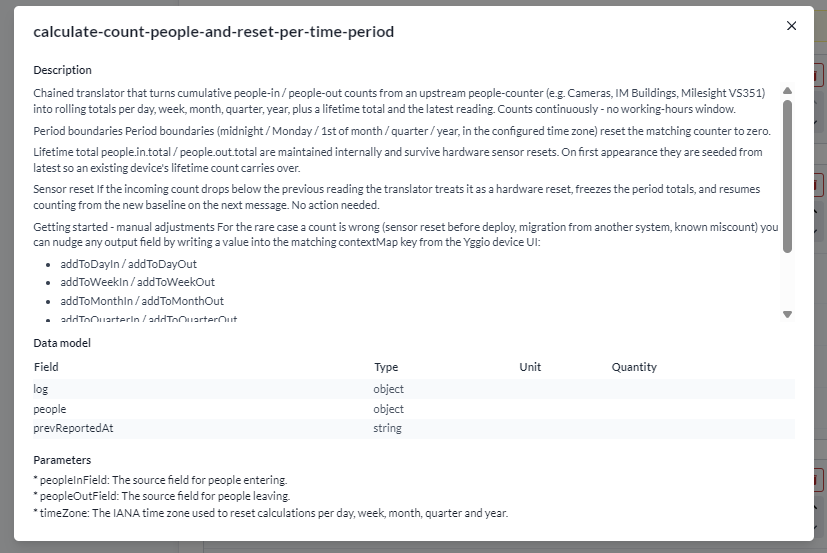
This is how a translator's description, data model, and parameters render once it's added to a device:
Exercise 4 - Package and upload
-
Fill in
manifest.json(name, version,apiVersion, description,match,spec, optionalparameters) - declare each output field inspecwith its{type, unit, quantity}. -
Run
node translator-build.jsto producetranslator.json. -
POSTit to the translators endpoint in Swagger, then attach it to a device via the device'stranslatorPreferences. Alternatively, attach it directly from the device's Translators section: click+ Add translator, filter by name, and click the (i) button next to a result to preview its description before adding it.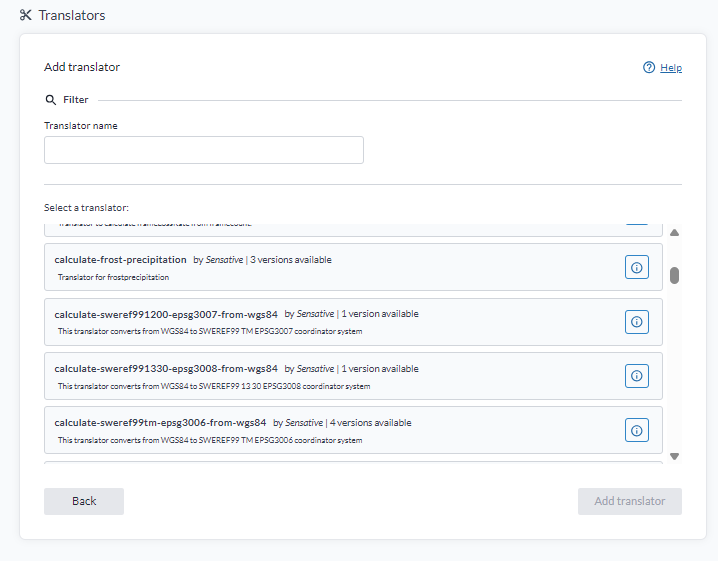
-
Send (or simulate) a payload and confirm the decoded, canonical fields appear on the device.
Exercise 5 - Troubleshoot
If nothing appears after an update:
- Open the device's Logs, filter Type =
Debug, Category =System- a crashing translator logs its error there (kept for 6 hours). Copy the failing input back into the harness to reproduce.
- No log at all? The translator either ran fine or never triggered - check the device's Last reported column; if it updated, the translator ran.
- Most common cause: an output field not in
spec, or a non-canonical name.
What you learned
- Why translators must emit canonical field names, units and quantities.
- How to build, test locally without any of the IoT platform's infrastructure, package and upload a translator.
- How to find and fix a failing translator via the device Logs.
Where next
- Translator Development - templates
for
calculate,set-alarmand analytics translators, and the full checklist. - Related: Node-RED - a great SDK for building and simulating translators. This is the last lesson in the module.