Lesson 3.3 Node-RED
Node-RED is a low-code, flow-based tool for wiring together hardware, APIs and services. With the IoT platform it's used to simulate devices, integrate third-party systems, and as an SDK for building and testing translators. In this lesson you'll connect Node-RED to the IoT platform and push simulated data in.
The full guide is Node-RED; this lesson is the hands-on walkthrough.
Before you start
- Node-RED installed (nodered.org).
- Access to your server's Swagger UI (
https://staging.yggio.net/swagger). - Network access from Node-RED to the IoT platform's MQTT broker and REST API. Keep Node-RED behind a firewall.
Exercise 1 - Send one simulated reading (fastest first success)
- In Swagger, create a
basicCredentialSet(a username/password for MQTT), then reserve onereservedMqttTopicof the formyggio/generic/v2/<your-unique-id>. - In Node-RED, add an MQTT out node. Create an MQTT server pointing at the IoT platform's URL, with the basicCredentialSet username/password under Security, and set the topic to the one you reserved.
- Wire an inject node (payload = JSON
{"temperature": 21}) into the MQTT out node and Deploy. - In the IoT platform, a new device appears within a minute, showing
temperature.
You've just pushed data into the IoT platform from Node-RED.
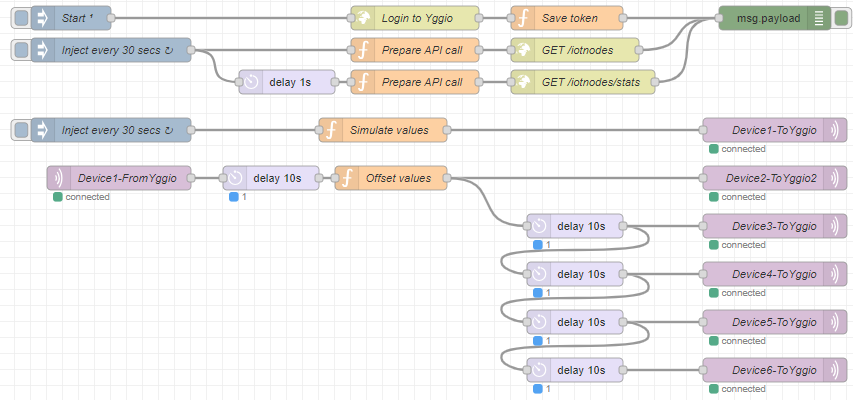
Exercise 2 - The full example flow
Import the ready-made example to see bidirectional MQTT plus the REST API:
- Import the example flow.
- Follow the setup in the Node-RED guide (the IoT platform: token, basicCredentialSet, 6 reserved topics; Node-RED: credentials and MQTT server). Deploy.
- Watch six simulated devices report into the IoT platform, a REST
GET /iotnodescall run, and (after the final MQTT-channel step) data flow back out of the IoT platform.
Exercise 3 - Build a translator in Node-RED
Because Node-RED and the IoT platform share the same JavaScript engine, it's an ideal place to develop translators (see Lesson 3.7):
- Import the my-first-translator flow.
- It generates simulated data, runs a
translatefunction, and prints the translator + spec to the console - ready to paste into the translator API. - Remember: the output must use canonical field names, and the IoT platform's sandbox
is narrower than Node-RED (no
require, timers, network) - see the guide's caveats.
What you learned
- How to connect Node-RED to the IoT platform over MQTT and simulate device data.
- How the example flow demonstrates bidirectional MQTT + the REST API.
- Why Node-RED is a strong translator SDK, and how it differs from the IoT platform's sandbox.
Where next
- Node-RED developer guide - hardware decoders, data
flows (
additionalDeviceUpdates), and debugging. - Next lesson: MQTT Explorer.