Publishing to external services
Yggio supports pushing device update data to external services.
There are two ways we achieve this, our own internal Publisher and NGSI subscriptions.
They function similarly, but there are some significant differences.
The main differences are support for MQTT and the format of the published data.
NGSI subscriptions
Documentation of NGSI subscriptions can be found here
Publisher
The publisher an internal service, sending data through either HTTP or MQTT.
To receive updates from an entity using the Publisher, you have to create a channel. The channel is a description of where updates to the iotnode should be sent. See the figure below.
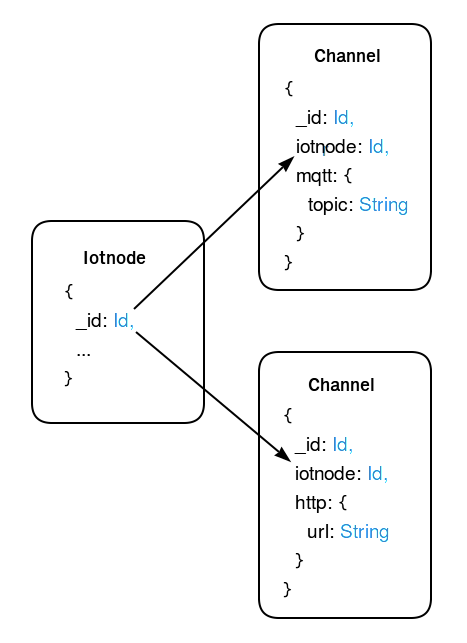
HTTP data will be sent through a POST request to the channel url.
MQTT data will be sent through the Yggio MQTT broker to the channel topic.
The request body will be of the following format:
{
  iotnode: Iotnode,
  diff: Object,
  event: Object
}
iotnode is the iotnode entity that has been updated.
diff contains the attributes that was changed in the update.
event contains the attributes that triggered the update.
Setting up a channel
Creating a channel is done by a simple POST request to our REST API, details can be found on Swagger.
Requirements for HTTP and MQTT channels differ and can be found below. Channels always require a name, and either an iotnode or a deviceGroup (see Device group channels).
HTTP
Creating an HTTP channel also requires a url.
The URL will not be changed in any way in Yggio, so make sure it matches your server exactly.
This means including http/https if required.
Updates for the iotnode will be POSTed to the URL with header Content-Type: application/json; charset=utf-8.
An optional headers field is available for HTTP channels - a JSON object of additional HTTP headers to include in every request. For example:
{ "X-Api-Key": "my-secret-key" }
Basic Auth is just an Authorization header. Set it to Basic <base64>, where <base64> is btoa("username:password") in a browser, or Buffer.from("username:password").toString("base64") in Node.js.
Example channel creation with Basic Auth:
{
  "name": "My secured endpoint",
  "iotnode": "<device-id>",
  "http": {
    "url": "https://my-endpoint.example.com/ingest",
    "headers": { "Authorization": "Basic dXNlcjpwYXNz" }
  }
}
where dXNlcjpwYXNz is btoa("user:pass").
Any Authorization header is write-only - it is accepted on create/update but redacted (never returned) by the API.
When configuring a channel in the UI, you can enter a plain-text username and password in the Basic Auth fields - Yggio will encode them into the Authorization header before saving.
MQTT
Creating a MQTT channel requires a type.
You have the option to choose between keycloakUser or basicCredentialsSet as type.
The recipient field specifies the identifier of the MQTT credentials that should be used to access the channel.
If the type is basicCredentialsSet, recipient must be the ID of the associated Basic Credentials Set.
If the type is keycloakUser, recipient must be the user ID of the Keycloak user.
Yggio hosts its' own broker, and publishes iotnode updates to user- or client-specific topics. It's still required to create a channel in order to see the updates. For information on how to connect, please refer to MQTT (data consumer).
Device group channels
A channel created with deviceGroup in place of iotnode applies to every device in the group, including devices added later. A device that leaves the group stops publishing on it, and deleting the group deletes its channels.
The user who creates a group channel owns it. A member's updates are only sent on it while the owner can read that device, so adding a device to a group never shares it with someone who could not already see it. The owner and the group's admins can view, edit and delete a group channel.
Over MQTT, a group channel publishes every member's updates to the group's topic rather than each device's:
yggio/output/v2/[ID]/iotnode/[deviceGroupId]
Each message still names the device it came from in iotnode._id.
GET /api/channels?deviceGroup=<deviceGroupId> lists a group's channels: all of them for a group admin, otherwise only the caller's own. GET /api/channels?iotnode=<iotnodeId> also returns the channels of every group the device is in.