Larmtranslatorer
En larmtranslator bevakar ett fält som redan har avkodats ur en enhet och höjer ett true/false-larm
när värdet korsar ett tröskelvärde du sätter. Yggio levererar en uppsättning färdiga som täcker vanliga
storheter, plus en generisk som fungerar på vilket numeriskt fält som helst.
Larmtranslatorer är kedjade translatorer: de körs ovanpå enhetens hårdvarutranslator och läser fält den redan har producerat, inte råa payloads. Lägg till en på en enhet så dyker larmfälten upp vid sidan av enhetens vanliga data, där vyer, dashboards och regelmotorn kan använda dem.
Det här är också hur avvikelseövervakning normalt görs i Yggio. En larmtranslator fångar det avvikande beteende som går att beskriva som ett tröskelvärde, ett band, en förändringstakt eller ett tidsfönster, vilket täcker de flesta fall och inte kräver någon inlärningsperiod.
Varför använda en larmtranslator
Ett tröskelvärde skulle kunna skrivas rakt in i en regel. Att i stället lägga det i en translator är det som håller reglerna enkla.
Translatorn sköter detekteringen, och den kan skräddarsys efter exakt det beteende scenariot kräver:
en enkel gräns, ett varningsband och ett kritiskt band, en förändringstakt, ett villkor som måste
hålla i flera rapporter i rad, eller en algoritm som mögelrisk. Hur avancerad den logiken än är blir
resultatet alltid samma form, en boolean. Regeln blir då bara någonsin detektera, sedan agera:
larmfältet blir true, alltså skicka ett mejl eller ett SMS, eller sätt en aktuator. En enkel regel
betjänar ett helt bestånd, oavsett vad varje enhet egentligen bevakar.
Tid är en del av det. En translator kan filtrera på tid på dygnet, så att ett larm bara höjs när det faktiskt spelar roll: ett klassrum värt att ventilera under skoltid, tysta timmar mellan 22:00 och 06:00, en tom byggnad över natten som lämnas i fred. Translatorn höjer ett separat larm inom fönstret som rensar sig självt när fönstret stängs, så att en regel kan notifiera dagskiftet och en annan nattskiftet, och ingen av reglerna behöver veta något om klockan.
Hur tröskelvärden sätts
Tröskelvärden är translatorparametrar, satta på translatorn när du lägger till eller redigerar den på enheten. De flesta parametrar är valfria och bär ett rimligt standardvärde, så en translator fungerar oftast i samma stund den läggs till och kan justeras efteråt. Vissa är obligatoriska: lämnas en av dem tom misslyckas översättningen i körning i stället för att falla tillbaka. Translatorns egen beskrivning i gränssnittet listar varje parameter och dess standardvärde, där den har ett.
De flesta larmtranslatorer accepterar också fortfarande värdet från en contextMap-post med samma
namn, så att äldre uppsättningar fortsätter fungera. Att migrera dem till translatorparametrar
rekommenderas: parameterlistan anger vad varje värde är till för och vad dess standardvärde är, vilket
kontextkartan inte gör.
Två beteenden gäller för hela familjen:
- Hysteres. Varje tröskelvärde har ett hysteresband, så att ett värde som ligger precis på en gräns inte växlar larmet vid varje rapport. Larmet löser ut vid tröskelvärdet och rensas först när värdet har rört sig tillbaka förbi det med hysteresmängden.
- Loggposter. De flesta larmtranslatorer avger en färdig
log-post när ett larm först löser ut, och en rensad post när det återgår, så att ingenting blir kvar i en larmvy. Meddelandet innehåller det utlösande värdet. En regel kan plocka upp det för att skicka ett mejl eller skriva till kontologgen.
Om indatafältet saknas eller tröskelvärdena är inkonsekventa skriver translatorn ett errorMessage i
stället för ett larm. Det visas i enhetens Data-sektion under filtret All.
Tillgängliga larmtranslatorer
Temperatur och luftfuktighet
| Translator | Larmar på | Larmfält |
|---|---|---|
set-alarm-temperature | Lufttemperatur över en hög gräns eller under en låg | temperatureHighAlarm, temperatureLowAlarm |
set-alarm-temperature-dual-high-low | Temperatur, med två band: ett brett varningsband och ett snävare kritiskt band | temperatureHighAlarm, temperatureLowAlarm, temperature2HighAlarm, temperature2LowAlarm |
set-alarm-temperature-from-average-temperature | Samma som set-alarm-temperature, men läser averageTemperature | averageTemperatureHighAlarm, averageTemperatureLowAlarm |
set-alarm-temperature-f-dual-high-low | Tvåbandstemperatur för platser som rapporterar i Fahrenheit, så tröskelvärden sätts i °F | temperatureFHighAlarm, temperatureFLowAlarm, temperatureF2HighAlarm, temperatureF2LowAlarm |
set-alarm-external-temperature-dual-high-low | Tvåbandsövervakning av en extern givare, som ett kyl-, frys- eller processelement | externalTemperatureHighAlarm, externalTemperatureLowAlarm, externalTemperature2HighAlarm, externalTemperature2LowAlarm |
set-alarm-surface-temperature-dual-high-low | Tvåbands yt- eller kontakttemperatur: ett rör, ett lager, en vägbana | surfaceTemperatureHighAlarm, surfaceTemperatureLowAlarm, surfaceTemperature2HighAlarm, surfaceTemperature2LowAlarm |
set-alarm-water-temperature-dual-high-low | Tvåbands vattentemperatur: legionellarisk på varmvatten, eller ett komfortband för en pool, ett akvarium eller en processtank | waterTemperatureHighAlarm, waterTemperatureLowAlarm, waterTemperature2HighAlarm, waterTemperature2LowAlarm |
set-alarm-soil-temperature-dual-high-low | Tvåbands marktemperatur för jordbruk och trädgårdsnäring: en frostvarning plus ett kritiskt frysband | soilTemperatureHighAlarm, soilTemperatureLowAlarm, soilTemperature2HighAlarm, soilTemperature2LowAlarm |
set-alarm-relative-humidity | Relativ fuktighet över en hög gräns eller under en låg | relativeHumidityHighAlarm, relativeHumidityLowAlarm |
set-alarm-mould-risk-from-temperature-and-humidity | Risk för mögeltillväxt, ur temperatur och fuktighet kombinerade över tid. Se Mögelriskdetektor | momentaryRisk, persistentMouldRiskAlarm, momentaryMouldRiskStartTime, momentaryMouldRiskEndTime |
Luftkvalitet och miljö
| Translator | Larmar på | Larmfält |
|---|---|---|
set-alarm-co2 | CO2 som byggs upp i ett använt utrymme, så att det kan ventileras innan folk blir slöa. Två stigande nivåer: varning och kritisk | co2HighAlarm, co2HighAlarm2 |
set-alarm-co | Kolmonoxid i ett garage, pannrum eller en bostad. Luktfri och långt mer akut giftig än CO2 | coHighAlarm, coHighAlarm2 |
set-alarm-air-quality | Inomhusluftkvalitetsindex (IAQ) som försämras på ett kontor, i ett klassrum eller ett mötesrum | iaqHighAlarm, iaqHighAlarm2 |
set-alarm-air-quality-during-time-window | Samma sak, men signalerat separat inom och utanför använda timmar, så att en tom byggnad över natten inte ger onödiga larm | iaqHighAlarm, iaqHighAlarm2, iaqHighAlarmInWindow, iaqHighAlarm2InWindow |
set-alarm-particulate-matter | Partikelhalt i luften: inomhusluft, byggarbetsplatser, industriprocesser, brandrök. Skilt från IAQ-indexet | particulateMatterHighAlarm, particulateMatterHighAlarm2 |
set-alarm-average-sound | För mycket buller i ett fläktrum, en verkstad eller en lokal | soundHighAlarm, soundHighAlarm2 |
set-alarm-average-sound-during-time-window | Tysta timmar nattetid, för bostadsområden nära en lokal, bar eller byggarbetsplats | soundHighAlarm, soundHighAlarm2, soundHighAlarmInWindow, soundHighAlarm2InWindow |
set-alarm-soil-moisture | Jorden för torr (grödstress) eller för blöt (överbevattning, vattensjuka, rotröta) | soilMoistureHighAlarm, soilMoistureLowAlarm |
set-alarm-frost-precipitation | Frost som bildas på en väg, bro eller gångbana, så att halkbekämpning eller ytvärme kan starta innan is byggs upp. Läser utslaget från calculate-frost-precipitation; inget att justera | frostPrecipitationAlarm, frostPrecipitationAlarm2 |
Effekt och energi
| Translator | Larmar på | Larmfält |
|---|---|---|
set-alarm-power | Onormalt hög effektuttagning: en överbelastad krets, eller en maskin som drar mer än väntat | powerHighAlarm, powerHighAlarm2 |
set-alarm-power-usage-low | Detektering av trasig lampa i gatubelysning: ljusen är tända men en armatur drar mindre än en frisk last | powerLowAlarm, powerLowAlarm2 |
set-alarm-energy-consumption | En hyresgäst eller anläggning som överskrider sin energibudget för perioden, med summan från calculate-energy-consumption-per-time-period | energyConsumptionHighAlarm, energyConsumptionHighAlarm2 |
set-alarm-battery-from-battery-level-or-voltage | Ett batteri som håller på att ta slut, ur antingen den rapporterade nivån eller spänningen, beroende på vad sensorn ger | batteryAlarm |
Rörelse, konstruktion och nivå
| Translator | Larmar på | Larmfält |
|---|---|---|
set-alarm-vibration | En pump, motor eller fläkt som vibrerar mer än normalt: ett tidigt tecken på obalans, slitage eller glapp före haveri | vibrationHighAlarm, vibrationHighAlarm2 |
set-alarm-impact | Ett fysiskt islag mot en bevakad konstruktion, som en truck som kör in i lagerställ | impactAlarm, impactAlarm2 |
set-alarm-tilt | En lutande eller vält tillgång: böjt ställage, en lutande stolpe eller mast, en snedställd maskin eller behållare. Passar naturligt ihop med set-alarm-impact | tiltHighAlarm, tiltHighAlarm2 |
set-alarm-level | Överfyllnad eller hög nivå: en tank, brunn, pumpgrop eller ett sopkärl som närmar sig fullt | levelHighAlarm, levelHighAlarm2 |
set-alarm-distance | En avståndsavläsning som är för långt: ett föremål som saknas på sin plats, eller en yta som drar sig undan från en ultraljuds- eller radarsensor | distanceHighAlarm, distanceHighAlarm2 |
Generiskt och diagnostik
| Translator | Larmar på | Larmfält |
|---|---|---|
set-alarm-custom | Vilket numeriskt fält som helst som enheten avger, valt av dig. Upp till tre larm: ett lågt och två stigande höga | customLowAlarm, customHighAlarm1, customHighAlarm2 |
set-alarm-custom-during-time-window | Samma som set-alarm-custom, plus en andra signal per tröskelvärde för ett tidsfönster, så att notifieringsregler kan rikta sig till mottagare på och utanför arbetstid var för sig | de tre ovan, plus customLowAlarmInWindow, customHighAlarm1InWindow, customHighAlarm2InWindow |
set-alarm-change-rate | En avläsning som ändras för snabbt, till exempel en temperatur som stiger snabbt, vilket kan signalera ett fel eller en skenande process | changeRateHighAlarm, changeRateHighAlarm2 |
set-alarm-from-consecutive-reports | Avstudsning av ett brusigt villkor: larmet går först när samma villkor har hållit i flera rapporter i rad, vilket filtrerar bort tillfälliga glitchar | consecutiveReportAlarm, consecutiveReportCount |
set-alarm-frame-loss-rate | Enhetens paketförlustgrad som stiger över ett tröskelvärde, vilket tyder på dålig radiotäckning | frameLossRateAlarm |
Parameternamn
Parameternamn följer det larmfält de styr, så de är förutsägbara när du väl kan mönstret. För en
storhet x:
| Parameter | Syfte |
|---|---|
xHighAlarmLevel | Övre tröskelvärde |
xLowAlarmLevel | Nedre tröskelvärde, där translatorn har ett |
xHighAlarm2Level | Andra, oftast strängare, övre tröskelvärdet |
xAlarmHysteresis | Hysteresband, tillämpat på varje tröskelvärde oberoende |
xField | Valfri. Läs värdet från en specifik fältsökväg i stället för den automatiska detekteringen |
Varje translator löser sitt indatafält automatiskt ur en kort lista med sannolika fältnamn, så i de
flesta fall kan xField lämnas osatt. Sätt den när en enhet lägger värdet någonstans ovanligt, till
exempel output.air_co2.
Translatorerna med tidsfönster tar tre parametrar till: timeWindowStart, timeWindowEnd och
timeZone.
Några translatorer avviker från mönstret:
set-alarm-custom tar källfältet uttryckligen, eftersom det inte finns något att detektera
automatiskt:
customSourceAlarmField: co2
customLowAlarmLevel: 333
customHighAlarm1Level: 400
customHighAlarm2Level: 550
customAlarmHysteresis: 1
set-alarm-temperature, som ett rakt exempel på standardmönstret:
temperatureHighAlarmLevel: 25
temperatureLowAlarmLevel: 17
temperatureAlarmHysteresis: 1
set-alarm-battery-from-battery-level-or-voltage har ett tröskelvärde och en hysteres för var och
en av de två indata: batteryLevelAlarmThreshold, batteryLevelHysteresis,
batteryVoltageAlarmThreshold, batteryVoltageHysteresis.
set-alarm-power-usage-low lägger till powerOnThreshold, den uttagning över vilken armaturen
räknas som tänd, så att en lampa som helt enkelt är släckt inte rapporteras som trasig.
set-alarm-from-consecutive-reports tar inputField, alarmValue och consecutiveReports.
set-alarm-frame-loss-rate använder frameLossRateAlarmLevel och
frameLossRateAlarmHysteresis.
set-alarm-frost-precipitation har inga tröskelvärden alls, bara det valfria
frostPrecipitationField.
Att lägga till en larmtranslator
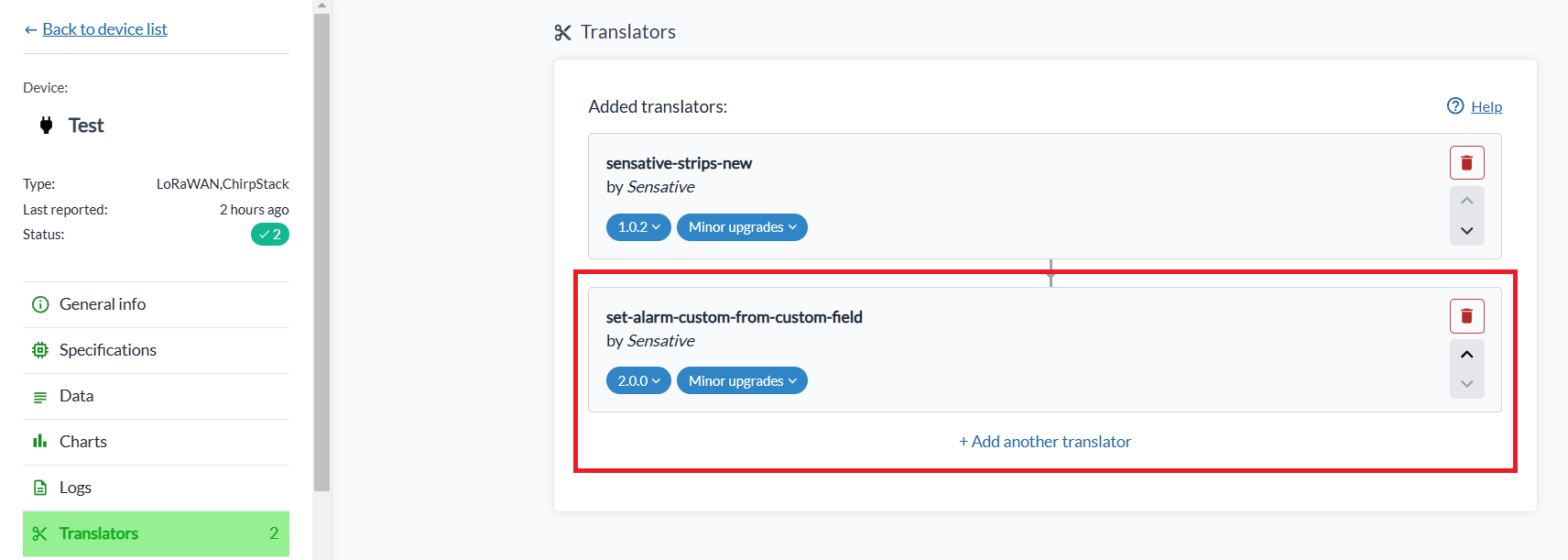
- Gå till Translators-sektionen på din enhet och lägg till den larmtranslator du vill ha.
-
Sätt parametrarna på translatorn. De flesta är valfria och faller tillbaka på ett standardvärde när de lämnas tomma, men vissa är obligatoriska. Parameterlistan, med varje standardvärde där det finns ett, visas i translatorns egen beskrivning i gränssnittet.
-
Vänta på att enheten skickar sin nästa rapport. Larmfälten dyker då upp i enhetens Data-sektion:
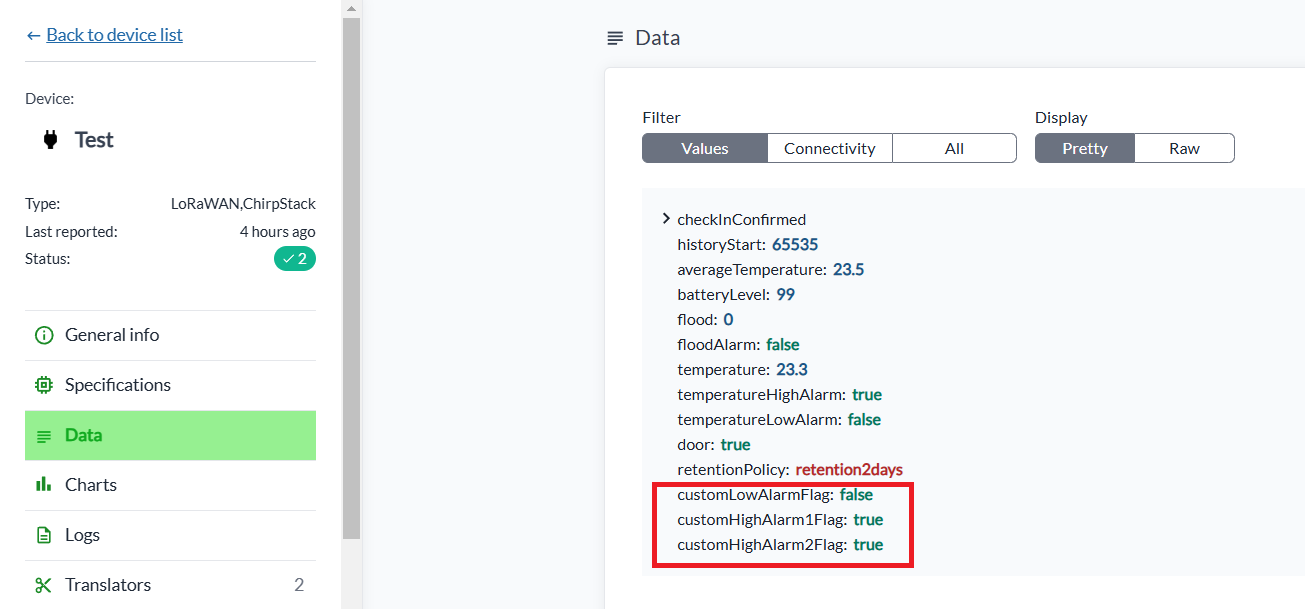
Om något är fel i uppsättningen, till exempel att källfältet saknas eller att ett lågt tröskelvärde
ligger över ett högt, skriver translatorn ett errorMessage som förklarar vad som är fel. Det visas i
Data-sektionen under filtret All.

Att lägga till larmtranslatorer på många enheter samtidigt
Larmtranslatorer kan läggas till på, eller uppdateras på, många enheter i en enda operation:
- Klicka på Select many i enhetslistan och välj enheterna.
- Välj Edit translators i rullgardinsmenyn Select action.
- Klicka på + Add translator och välj larmtranslatorn.
- Klicka på Confirm för att spara.
Mögelriskdetektor
set-alarm-mould-risk-from-temperature-and-humidity implementerar en vetenskapligt belagd algoritm
som utvärderar risken för mögeltillväxt utifrån omgivningstemperatur, relativ fuktighet och en
mögelrisktimer. Principen: om miljön förblir gynnsam för mögeltillväxt tillräckligt länge är risken
nära förestående och larmet höjs.
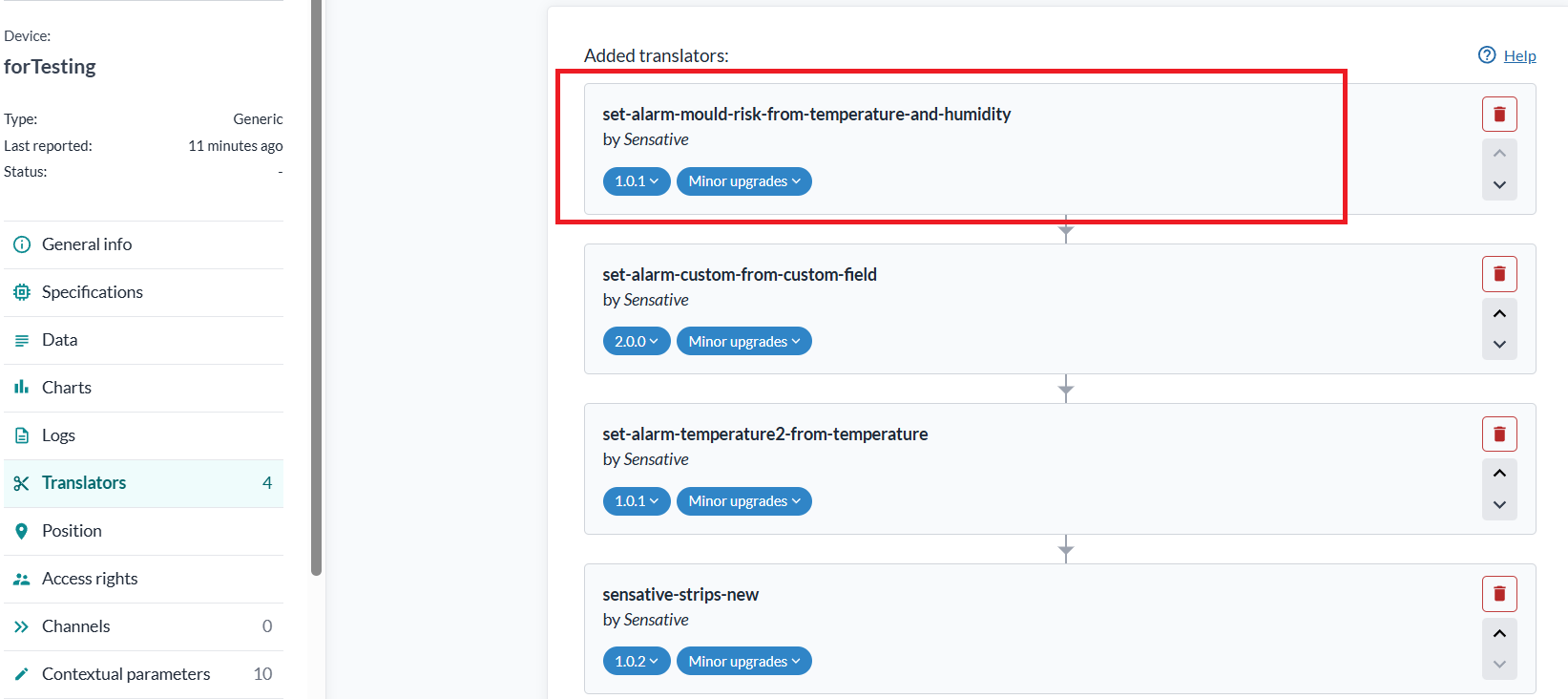
När translatorn är tillagd dyker tre fält upp i enhetens Data-sektion efter nästa rapport:
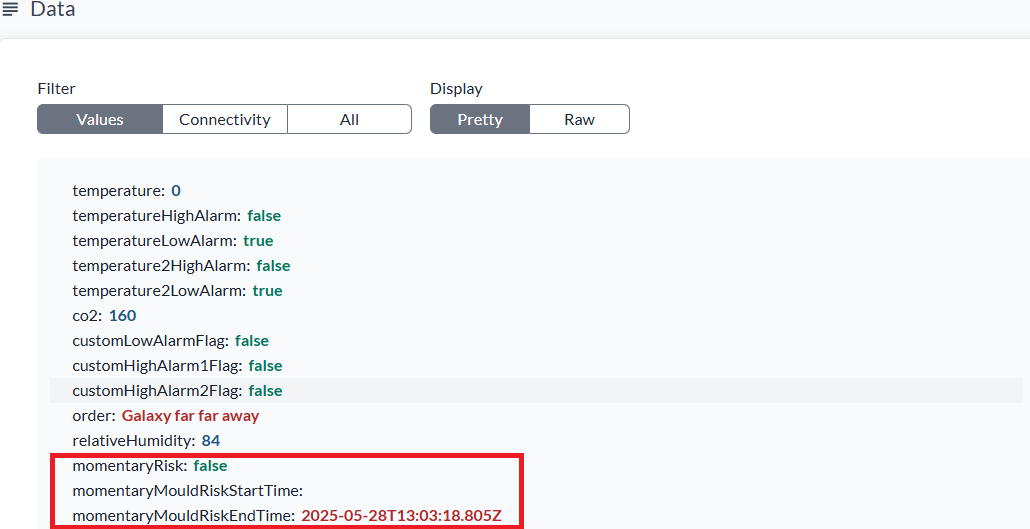
momentaryRisk börjar som false och blir true när kombinationen av temperatur och relativ
fuktighet stiger över det beräknade risktröskelvärdet, till exempel över 14 °C och 80 % relativ
fuktighet. Det indikerar att mögel kan börja utvecklas om tillståndet håller i sig.
Observera att momentaryRisk kan vara true under 14 °C om den relativa fuktigheten är onormalt hög,
eftersom det fortfarande är en god tillväxtmiljö för vissa mögelsorter.
momentaryMouldRiskStartTime sätts när momentaryRisk går från false till true, och
momentaryMouldRiskEndTime när det går tillbaka. Om risken förblir borta i fyra timmar bryts
riskuppbyggnaden och timern nollställs.
När momentaryRisk har varit oavbrutet true i 18 dagar dyker ett fjärde fält upp,
persistentMouldRiskAlarm, med värdet true:
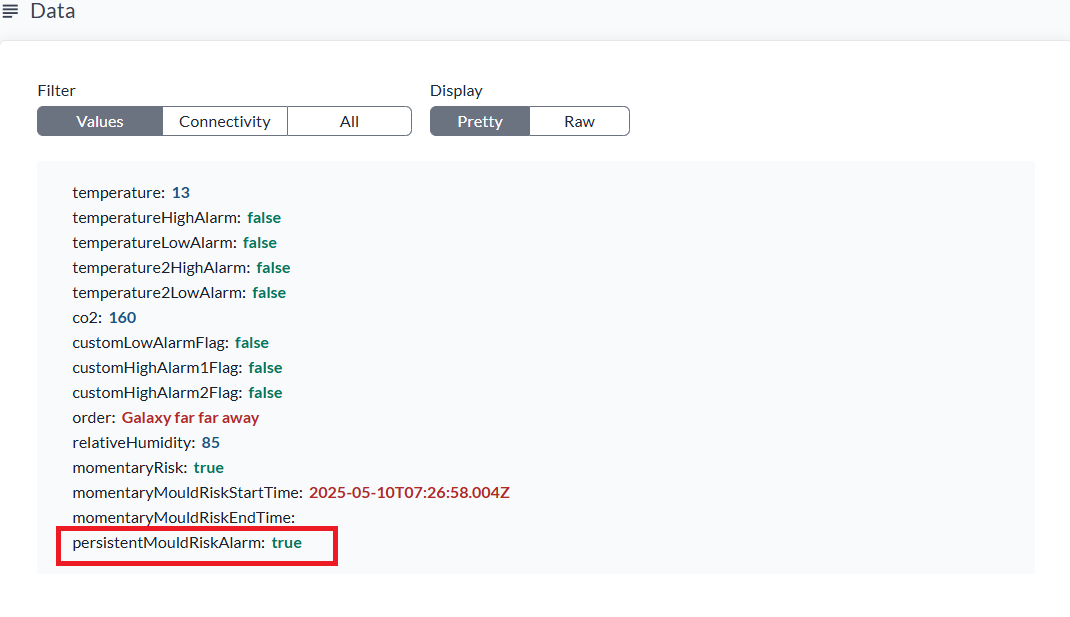
Det återgår till false när momentaryRisk har varit false i fyra timmar i rad, och ytterligare 18
dagars oavbruten risk måste passera innan det höjs igen.
Alla fyra värden är parametrar, så algoritmen kan justeras efter byggnaden eller klimatet:
| Parameter | Standard | Syfte |
|---|---|---|
temperatureThreshold | 14 °C | Vid eller över den här temperaturen gäller det fasta fukttröskelvärdet; under den sänks det effektiva fukttröskelvärdet proportionellt |
relativeHumidityThreshold | 80 % | Fuktighet över vilken rummet löper momentan risk vid varma temperaturer |
persistentRiskConfirmDays | 18 | Dagar den momentana risken måste bestå innan persistentMouldRiskAlarm höjs |
persistentRiskClearHours | 4 | Timmar risken måste vara borta innan larmet rensas igen |
Att se larmen
För att bygga en vy som visar aktuellt larmtillstånd över dina enheter, se Vy för larmövervakning.