SMS Connector
Den här guiden förklarar hur du skapar och konfigurerar en SMS-connector i Yggio. Tre leverantörer stöds: 46elks, Telnyx och Twilio.
Översikt
- SMS-connectors gör det möjligt att skicka SMS-meddelanden via regelåtgärder.
- Du måste ha ett konto hos en av de leverantörer som stöds.
- Obligatoriska fält valideras i gränssnittet.
Leverantörer som stöds
- 46elks (dokumentation)
- Telnyx (dokumentation)
- Twilio (dokumentation)
Skapa en SMS-connector
- Gå till avsnittet Connectors i Control Panel (
/control-panel-v2/connectors). - Klicka på Ny connector och välj SMS som typ.
- Välj din SMS-tjänsteleverantör. Fälten för inloggningsuppgifter nedan ändras efter den.
- Fyll i de nödvändiga fälten för din leverantör (se nedan).
- Ange avsändarnumret (From). För Telnyx och Twilio måste det vara i E.164-format (t.ex.
+1234567890). - Spara connectorn.
Fältdetaljer per Leverantör
Gemensamma Fält
| Fält | Beskrivning | Obligatoriskt | Validering |
|---|---|---|---|
| From | Avsändarnummer (se leverantörsnoteringar) | Ja | E.164 eller alfanumeriskt |
46elks
| Fält | Beskrivning | Obligatoriskt | Validering |
|---|---|---|---|
| API Username | 46elks-användarnamn | Ja | Ej tomt |
| API Password | 46elks-lösenord | Ja | Ej tomt |
From: Kan vara E.164 eller alfanumeriskt (max 11 tecken).
Telnyx
| Fält | Beskrivning | Obligatoriskt | Validering |
|---|---|---|---|
| API Key | Telnyx API-nyckel | Ja | Ej tomt |
From: Måste vara i E.164-format.
Twilio
| Fält | Beskrivning | Obligatoriskt | Validering |
|---|---|---|---|
| Account SID | Twilio Account SID (börjar med AC) | Ja | Måste börja med AC |
| Auth Token | Twilio Auth Token (hemlig) | Ja | Ej tomt |
From: Måste vara i E.164-format.
Exempel
Det här är connectorns fält. Mottagaren är inte ett av dem; den sätts på den regelåtgärd som skickar meddelandet.
46elks:
- API Username:
your_46elks_username - API Password:
your_46elks_password - From:
MyCompany
Telnyx:
- API Key:
your_telnyx_api_key - From:
+46700000000
Twilio:
- Account SID:
ACXXXXXXXXXXXXXXXXXXXXXXXXXXXXXXXX - Auth Token:
your_auth_token - From:
+46700000000
Observera
- För Telnyx och Twilio måste alla nummer vara i E.164-format (t.ex.
+1234567890). - För 46elks kan avsändaren vara E.164 eller en alfanumerisk sträng (max 11 tecken).
- Mottagare väljs per regelåtgärd, inte på connectorn.
- Du måste ha ett giltigt konto hos din valda leverantör.
Skärmbilder
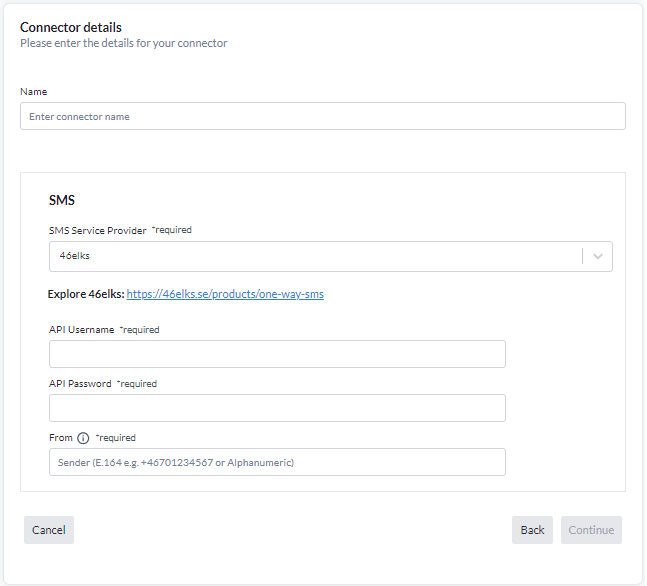
Fälten för inloggningsuppgifter ändras med den valda leverantören; From-avsändaren är gemensam för alla.
Meddelandestatistik
På den sparade connector-sidan visas en statistikpanel med:
- Total Sent: Antal meddelanden som skickats framgångsrikt.
- Total Fails: Antal misslyckade sändningsförsök.
- Sent This Month: Antal meddelanden skickade under innevarande månad.
- Success Rate: Andel lyckade leveranser.
- Attempts: Totalt antal sändningsförsök (lyckade + misslyckade).
- Last Sent: Tidsstämpel för den senast lyckade sändningen.
- Last Failed: Tidsstämpel för den senast misslyckade sändningen.
- Last Error: Det senaste felmeddelandet eller varningen, om något, med tidsstämpel.
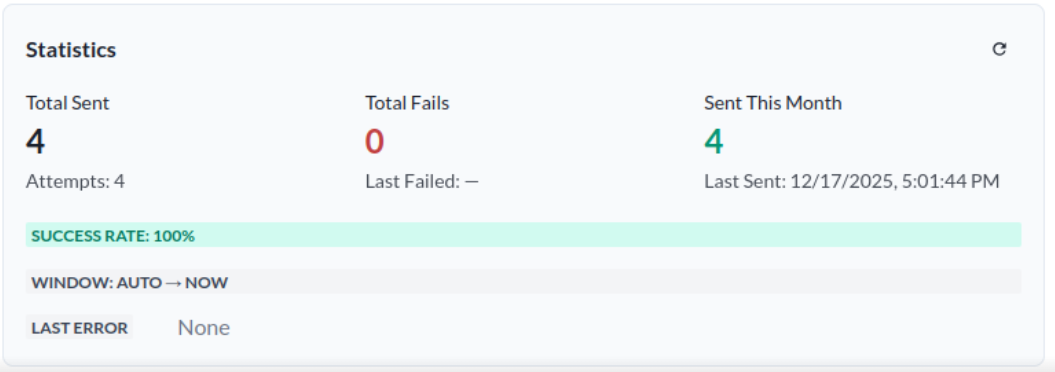
Denna statistik hjälper dig att övervaka connectorns funktion och prestanda.
Felloggning
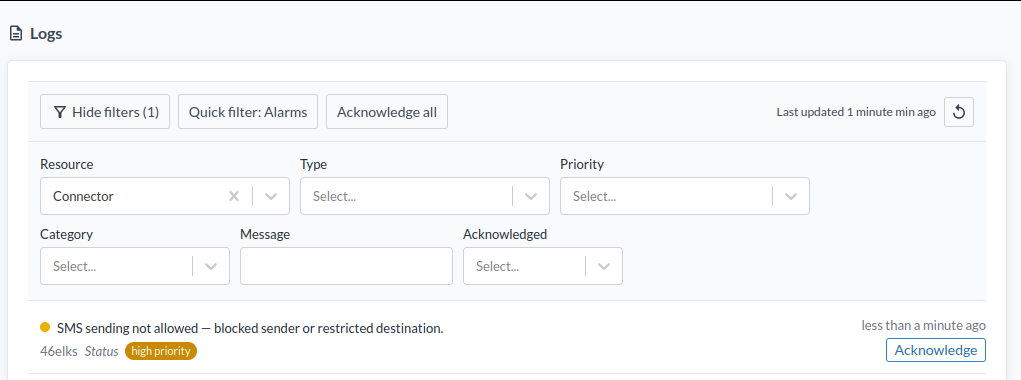
Om connectorn misslyckas med att skicka ett SMS-meddelande visas en fellogg i Logs under Resource → Connector. Du kan granska dessa loggar för att diagnostisera och lösa problem med connectorns konfiguration eller SMS-leverantören.