Connector för RSMP-trafiksignalstyrapparater
RSMP-connectorn ansluter en trafiksignalstyrapparat till Yggio över RSMP, det öppna protokoll som väghållare använder för att övervaka vägsidesutrustning av alla slag. Connectorn är uppkallad efter trafiksignalstyrapparater eftersom det är den utrustning Yggio avkodar idag. Styrapparaten rapporterar tillståndet för sina signalgrupper och detektorlogiker, och Yggio gör om det till vanliga enheter.
Att få in en anläggning i Yggio tar tre steg, och bara det första är den här connectorn:
- Skapa connectorn, en gång per anläggning. Den håller anläggningens identifierare och watchdogen. Det är den här sidan.
- Installera styrapparatkomponenten, enheten som representerar själva styrapparaten.
- Installera detektorlogikerna och signalgrupperna, en enhet per position du vill följa.
Steg 2 och 3 är enhetsinstallationer snarare än connector-inställningar, och ingenting skapas automatiskt: varje enhet installeras och tilldelas sin roll och sin position. De beskrivs, tillsammans med vad rollerna betyder och hur datan beter sig när den väl kommit in, under RSMP (Trafikledning).
Skapa connectorn
- Gå till Connectors → Ny connector → RSMP Traffic Light Controllers.
- Välj retention policy och flöde, och fortsätt sedan.
- Fyll i connectorns uppgifter:
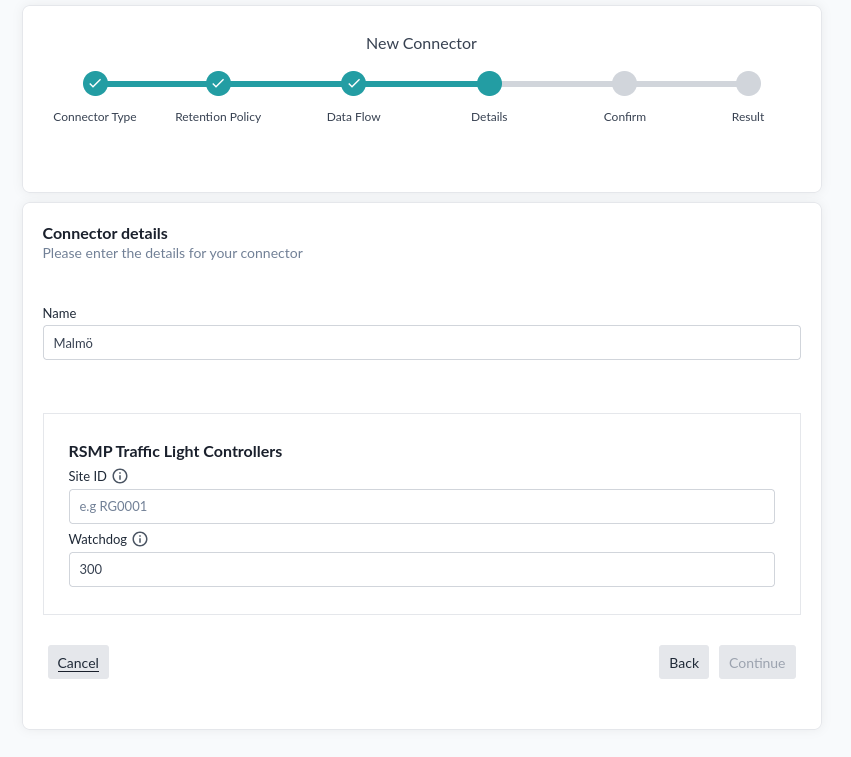
| Fält | Beskrivning |
|---|---|
| Name | Ett namn på connectorn. En per anläggning, så namnge den efter anläggningen |
| Site ID | RSMP-anläggningens identifierare, till exempel RG0001. Den måste matcha det styrapparaten annonserar, annars avvisas anslutningen |
| Watchdog | Timeout i sekunder innan anslutningen betraktas som förlorad. Standard 300 |
- Bekräfta uppgifterna och skapa connectorn.
Nästa steg
Connectorn ensam producerar ingen data. Fortsätt med att installera komponenterna, med start i styrapparaten.
Felsökning
Ingenting ansluter. Site ID måste matcha det styrapparaten annonserar. Det är det första att kontrollera, eftersom en avvikelse avvisas i stället för att rapporteras som ett dataproblem.
Anslutningen tappas och kommer tillbaka. Watchdogen är timeouten innan Yggio betraktar anslutningen som förlorad. En anläggning på en långsam eller ryckig förbindelse kan behöva ett längre värde än standardvärdet 300 sekunder.
Connectorn finns men ingenting rapporterar. Förväntat tills komponenter är installerade. Connectorn bär sessionen; det är enheterna som håller datan.
För problem med en enskild komponent, en enhet som inte rapporterar något eller rapporterar fel position, se RSMP (Trafikledning).