Roller
En roll säger vad en användare över huvud taget får göra. Åtkomsträttigheter säger vilka resurser de får göra det med. En användare med rollen Editor och inga åtkomsträttigheter ser fortfarande ingenting; en användare med åtkomst till varje enhet och rollen Viewer Basic kan titta men inte röra.
| Svarar på | |
|---|---|
| Roller | Vad en användare över huvud taget får göra |
| Åtkomsträttigheter | Vilka resurser de når, och på vilken nivå |
| Användargrupper | Vilka som får de åtkomsträttigheterna tillsammans |
En roll gäller hela plattformen, inte en enskild resurs. Varje användare har exakt en, antingen en fördefinierad eller en egen roll.
De fördefinierade rollerna
| Roll | Vad den tillåter |
|---|---|
| Admin | Allt: skapa, läsa, uppdatera, radera och administrera, på varje resurs |
| Editor | Läsa och ändra, men inte skapa eller radera. Endast läsning på åtkomsträttigheter. Ingen åtkomst till roller |
| Installer | Läsa allt. Ändra enheter, skapa enhetsserienummer och kanaler. Ingen åtkomst till roller |
| Viewer Full | Endast läsning. Hela gränssnittet utom Organizations och User groups |
| Viewer Standard | Endast läsning. Dashboards, enhetslistan och kartan |
| Viewer Basic | Endast läsning. Endast dashboards |
Editor
Editor kan hämta och ändra resurser, men inte skapa eller radera dem. I API-termer är det GET, PUT och PATCH men inte POST eller DELETE. Åtkomsträttigheter är skrivskyddade för en Editor, så de kan se vem som har åtkomst till något utan att kunna ändra det.
Installer
Installer är byggd för personen som står framför hårdvaran. Utöver läsåtkomst till resten av plattformen tillåter den:
- att ändra enheter, vilket är vad Enhetsuppdateraren gör;
- att skapa enhetsserienummer, vilket är vad att installera en enhet gör;
- att skapa kanaler, så att en montörs verktyg kan prenumerera på enheten de just satt upp.
De tre viewer-rollerna
Alla tre viewer-roller har identiska behörigheter - endast läsning på allt utom roller. De skiljer sig bara i hur mycket av gränssnittet som visas.
| Dashboards | Enheter, Karta | Connectors, Logs, Apps, Reports | Organizations, User groups | |
|---|---|---|---|---|
| Viewer Basic | ja | nej | nej | nej |
| Viewer Standard | ja | ja | nej | nej |
| Viewer Full | ja | ja | ja | nej |
Välj den smalaste som täcker vad personen behöver se. Viewer Basic passar någon som ska titta på en dashboard på en vägg och inget annat.
Egna roller
En egen roll byggs genom att välja resurser och, för var och en, vilka åtgärder som tillåts på den. Använd en när ingen av de fördefinierade passar - en entreprenör som får skapa rapporter men inget annat, till exempel.
Ge rollen ett namn, lägg till resurserna den omfattar, och välj åtgärderna per resurs. (*) All resources täcker allt i en enda post.
De fem åtgärderna
Åtgärderna är HTTP-metoderna i API:et, så en egen roll är i praktiken en lista över vilka API-anrop användaren får göra.
| Åtgärd | Metod | Vad den vanligtvis innebär |
|---|---|---|
| Get | GET | Läsa den, och lista den |
| Post | POST | Skapa en ny |
| Put | PUT | Ersätta en befintlig |
| Patch | PATCH | Ändra en del av en befintlig |
| Delete | DELETE | Ta bort den |
Redigering är delad mellan de två skrivmetoderna beroende på resurs: enheter, connectorer och
beräkningar sparas med PUT, geofences och enhetsgrupper med PATCH, dashboards med båda. Ge Put
och Patch tillsammans till den som ska kunna redigera, annars sparar vissa skärmar och andra
vägrar.
Vad varje resurs täcker
Varje post i väljaren skyddar en grupp API-endpoints. Swagger-taggen är rubriken att leta under i Swagger UI.
| Post i väljaren | API-endpoints | Swagger-tagg |
|---|---|---|
| (*) All resources | Allt nedan | - |
| Access | /access-rights | AccessRights |
| App | /apps | Apps |
| Basic Credentials Set | /basic-credentials-sets | BasicCredentialsSets |
| Calculation | /calculations | Calculations |
| Channel | /channels | Channels |
| Connector | /connectors, /vyer | Connectors |
| Dashboard | /dashboards | Dashboards |
| Data Listing | /data-listings | Data Listings |
| Device | /iotnodes, /jobs, och Sensative VSM-endpointerna /almanac-fleet-jobs, /app-upgrade-jobs, /vsm-apps | Iotnodes, Jobs, AlmanacFleetJobs, AppUpgradeJobs, VsmApps |
| Device Group | /device-groups | Device-groups |
| Device Serial | /device-serials | Finns inte i Swagger |
| Flow | /flows | Flows |
| Geofence | /geofences | Geofences |
| Image | /images | Images |
| Location | /locations | Locations |
| Log | /logs | Logs |
| Organization | /organizations | Organizations |
| Report | /reports, inklusive rapportscheman | Reports |
| Reserved MQTT Topic | /reserved-mqtt-topics | ReservedMqttTopics |
| Roles | /roles | Roles |
| Rule Engine | /rules-v2 | Rules |
| Rules | /rules, den äldre motorn | Finns inte i Swagger |
| Translator | /translators | Translators |
| User | /users | Users |
| User Group | /usergroups | Usergroups |
Device täcker mer än enhetslistan. Massjobben för enheter skyddas av Device, och det gör även
Almanackssändning och
Appuppgradering, som bara fungerar med Sensative VSM-sensorer. En
roll som ger Device POST tillåter därför också att starta en flottevid almanackssändning eller
appuppgradering.
Kombinationer som fungerar
| Personen | Ge dem |
|---|---|
| Tittar på en dashboard på en vägg | Dashboard GET, Device GET |
| Installerar enheter i fält | Device GET PUT PATCH, Device Serial POST, Channel POST, Location GET |
| Bygger dashboards åt andra | Dashboard alla fem, Device GET, Data Listing GET |
| Kör rapporter varje månad | Report alla fem, Device GET |
| Underhåller regler | Rule Engine alla fem, Device GET, Calculation GET |
| Styr vem som ser vad | Access alla fem, User GET, User Group alla fem |
| Tjänstekonto för integration | Device GET PUT, Channel GET POST DELETE |
Device GET återkommer i nästan varje rad. Dashboards, rapporter, regler och beräkningar visar alla
enhetsdata, så en roll som bara ger sin egen resurs visar tomma widgetar och rapporter utan rader.
Kombinationer som inte fungerar
- En roll utan åtkomsträttigheter når ingenting. Rollen tillåter API-anropet; åtkomsträttigheten avgör vilka resurser anropet returnerar. Båda behövs, varje gång.
- Views och Report Schedule finns i väljaren men skyddar inga endpoints. Att ge dem har ingen effekt. Rapportscheman täcks av Report.
- Put utan Patch, eller tvärtom, fungerar bara halvvägs. Vilken en skärm använder beror på resursen, som ovan, så ge båda.
- Access
POSTutan admin på något delar ändå ingenting. Åtkomsträttigheter kan bara ges på resurser användaren har admin på, oavsett vad rollen säger. Ägare klarar det eftersom ägarskap bär alla scopes. - Roles
POSTger kontroll på administratörsnivå, eftersom en användare som kan skriva roller kan höja sin egen. - Device Serial har bara en endpoint för att skapa. Get, Put, Patch och Delete på den gör ingenting.
Note: ingen av de fördefinierade rollerna utom Admin innehåller Roles. En egen roll är enda sättet att ge rollhantering utan att ge full Admin.
Tilldela en roll
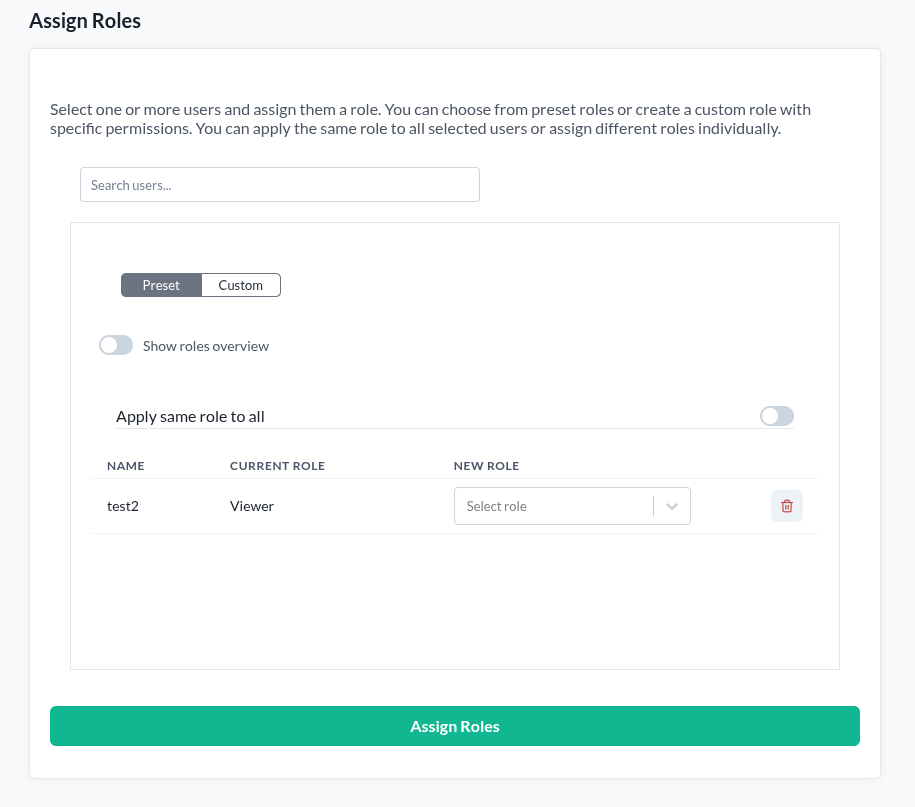
Sidan Roles är tillgänglig för organisationsägare. Om du inte äger en organisation rapporterar sidan att du inte har behörighet att öppna den.
- Öppna Roles.
- Sök upp och välj användarna som ska tilldelas. Flera kan väljas samtidigt.
- Välj Preset och en roll, eller Custom och bygg en.
- Med flera användare valda ger Apply same role to all dem alla samma roll. Låt den vara av för att sätta varje användares roll individuellt.
- Tryck Assign roles.
Varje användares nuvarande roll visas bredvid dem, så du ser vad du ändrar innan du ändrar det.
Roller inom en organisation
En organisationsmedlems roll visas och sätts också på deras rad i Organisationshanteraren. Det är samma plattformsroll, nådd från en annan sida, och den lyder under sina egna regler om vem som får ändra vems.