Lektion 3.3 Node-RED
Node-RED är ett low-code, flödesbaserat verktyg för att koppla ihop hårdvara, API:er och tjänster. Med IoT-plattformen används det för att simulera enheter, integrera tredjepartssystem och som ett SDK för att bygga och testa översättare. I denna lektion ansluter du Node-RED till IoT-plattformen och skickar in simulerad data.
Den fullständiga guiden är Node-RED; denna lektion är den praktiska genomgången.
Innan du börjar
- Node-RED installerat (nodered.org).
- Åtkomst till din servers Swagger-gränssnitt
(
https://staging.yggio.net/swagger). - Nätverksåtkomst från Node-RED till IoT-plattformens MQTT-broker och REST-API. Håll Node-RED bakom en brandvägg.
Övning 1 - Skicka en simulerad avläsning (snabbast till första resultatet)
- I Swagger, skapa en
basicCredentialSet(ett användarnamn/lösenord för MQTT), och reservera sedan enreservedMqttTopicav formenyggio/generic/v2/<ditt-unika-id>. - I Node-RED, lägg till en MQTT out-nod. Skapa en MQTT-server som pekar mot IoT-plattformens adress, med basicCredentialSet:s användarnamn/lösenord under Security, och sätt ämnet till det du reserverade.
- Koppla en inject-nod (payload = JSON
{"temperature": 21}) till MQTT out-noden och Deploy. - I IoT-plattformen dyker en ny enhet upp inom en minut och visar
temperature.
Du har nu skickat data till IoT-plattformen från Node-RED.
Övning 2 - Det fullständiga exempelflödet
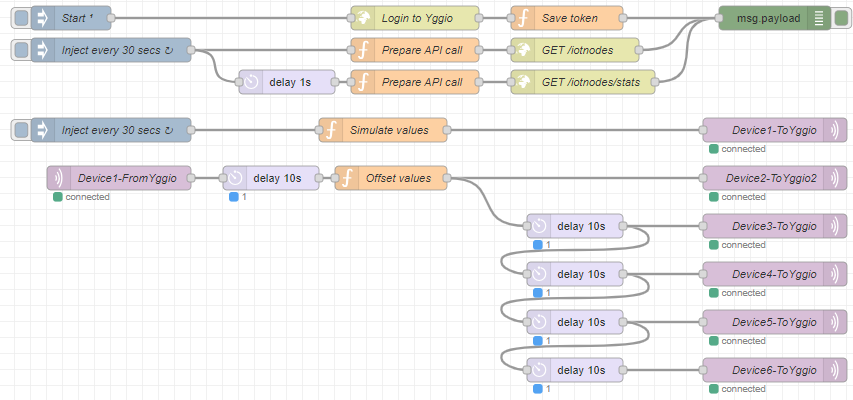
Importera det färdiga exemplet för att se dubbelriktad MQTT samt REST-API:et:
- Importera exempelflödet.
- Följ konfigurationen i Node-RED-guiden (IoT-plattformen: token, basicCredentialSet, 6 reserverade ämnen; Node-RED: autentiseringsuppgifter och MQTT-server). Deploy.
- Se hur sex simulerade enheter rapporterar in i IoT-plattformen, ett
REST-anrop
GET /iotnodeskörs, och (efter det sista MQTT-kanalsteget) data flödar tillbaka ut ur IoT-plattformen.
Övning 3 - Bygg en översättare i Node-RED
Eftersom Node-RED och IoT-plattformen delar samma JavaScript-motor är det en idealisk plats att utveckla översättare på (se Lektion 3.7):
- Importera flödet my-first-translator.
- Det genererar simulerad data, kör en
translate-funktion och skriver ut översättaren + specifikationen i konsolen - redo att klistras in i översättar-API:et. - Kom ihåg: utmatningen måste använda kanoniska fältnamn, och
IoT-plattformens sandlåda är snävare än Node-RED (inga
require, timers eller nätverk) - se guidens förbehåll.
Vad du lärde dig
- Hur man ansluter Node-RED till IoT-plattformen via MQTT och simulerar enhetsdata.
- Hur exempelflödet demonstrerar dubbelriktad MQTT + REST-API:et.
- Varför Node-RED är ett starkt SDK för översättare, och hur det skiljer sig från IoT-plattformens sandlåda.
Vart härnäst
- Node-RED-utvecklarguiden - hårdvarudekodrar,
dataflöden (
additionalDeviceUpdates) och felsökning. - Nästa lektion: MQTT Explorer.